How Does the Drinks & Beverage Calculator Work?
The calculator runs 6 short steps, one question at a time. The bar plan you get is built around the headcount, the duration, and the categories you are actually serving, not a generic bar-per-guest default. The whole thing takes under 2 minutes on a phone or laptop, with no signup or email wall before the result.
Step 1, event type. Say what kind of party you are hosting. It names the occasion on the bar plan, but the quantities come from the steps after it, so a wedding reception and a casual housewarming with matching answers get the same bar.
Step 2, guest count. Enter the confirmed headcount, anywhere from 5 to 300. Every quantity on the result scales off this number, so it is the one worth getting right before anything else.
Step 3, duration. Pick how long the event runs (about 2 hours, 3 to 4 hours, 5 to 6 hours, or all day). Duration sets how many drinks each guest gets through, and it is also what tips the ice estimate: 5 to 6 hours carries an extra quarter-pound of ice per guest on top of the baseline, and an all-day event an extra half-pound.
Step 4, drink categories. Tick up to 4 of the 8 the calculator tracks: beer, wine, cocktails, spirits, mocktails, soft drinks, coffee and tea, and champagne. Each ticked category comes back with its own quantity line, so the cap is there to keep the bar buildable rather than exhaustive.
Step 5, crowd preference. Pick how your crowd drinks (mostly drinkers, a mixed room, mostly non-drinkers, or family with kids). It moves weight between the alcohol lines and the alcohol-free ones, so a mostly-non-drinking room does not come back with a wine order sized for a room of drinkers.
Step 6, cocktail style. This one shows up only once cocktails are among your Step 4 picks. Pick the style the cocktails should follow (classic, tropical, holiday, or a signature of your own). Classic, tropical and holiday unlock the recipe block on the result, so the pour station gets actual recipes rather than a drink count alone. Signature brings a short note on naming and batching 1 or 2 specials instead.
🛒 As an Amazon Associate, we earn from qualifying purchases, at no extra cost to you.
Drink Dispenser
Check Price on AmazonBeverage Tub
Shop on AmazonCocktail Shaker Set
Shop on AmazonUse the Calculator Before You Open the Liquor Store App
Size the drinks order from a mood-board screenshot of someone else's bar and the quantities rarely match your event's format and duration. The calculator scales the beer, wine and spirits lines to the headcount and duration you are actually hosting, then hands you a list that fills the cart at the right headcount without the over-buy that guessing produces.
Four reasons hosts run the calculator before the liquor-store run.
- Duration-aware bottle math across categories. A 2-hour drinks evening and a 5-to-6-hour reception at the same headcount are different orders: the first works on 3 drinks per guest and the second on 6.5. The calculator picks up the duration at Step 3 and applies it across whichever drink lines you ticked, except coffee and tea and a champagne toast, so the order matches the time guests will actually be holding a glass. Skip that and you tend to buy on an all-day assumption for what turns out to be a 2-hour event.
- Soft drinks sized against the whole room. Soft drinks and coffee-and-tea are 2 of the 8 categories in their own right, not a footnote under the alcohol. Tick them and they come back with quantities sized to the headcount and the crowd preference, so the non-alcoholic end of the table does not run dry by hour 2 while 3 unopened reds sit beside it.
- An ice estimate with the formula shown. The calculator works ice at a pound per guest, adds a quarter-pound more per guest at 5 to 6 hours, and a half-pound more when the event runs all day. It prints that arithmetic beside the total, so a 30-guest evening comes to 30 pounds while the same 30 guests across a full day come to 45, and you can sanity-check either against the bag sizes the store actually sells.
- Glassware counted per drink type, with rotation built in. Wine glasses, pints, highballs and shot glasses come back at 1.5 per guest; cocktail and rocks glasses and soft-drink cups at 2 per guest, because those rotate hardest; mugs at 0.5 per guest, since coffee mostly lands in the first hour. A bar sized by feel can easily under-count the glassware and over-count the wine.
The calculator pairs naturally with the Party Servings Estimator for the per-category food plan the bar sits alongside, the Charcuterie & Tablescape Designer for the layout diagram of the board or table beside the bar, and the Cake Portions Planner for the cake-portion math at celebration events.
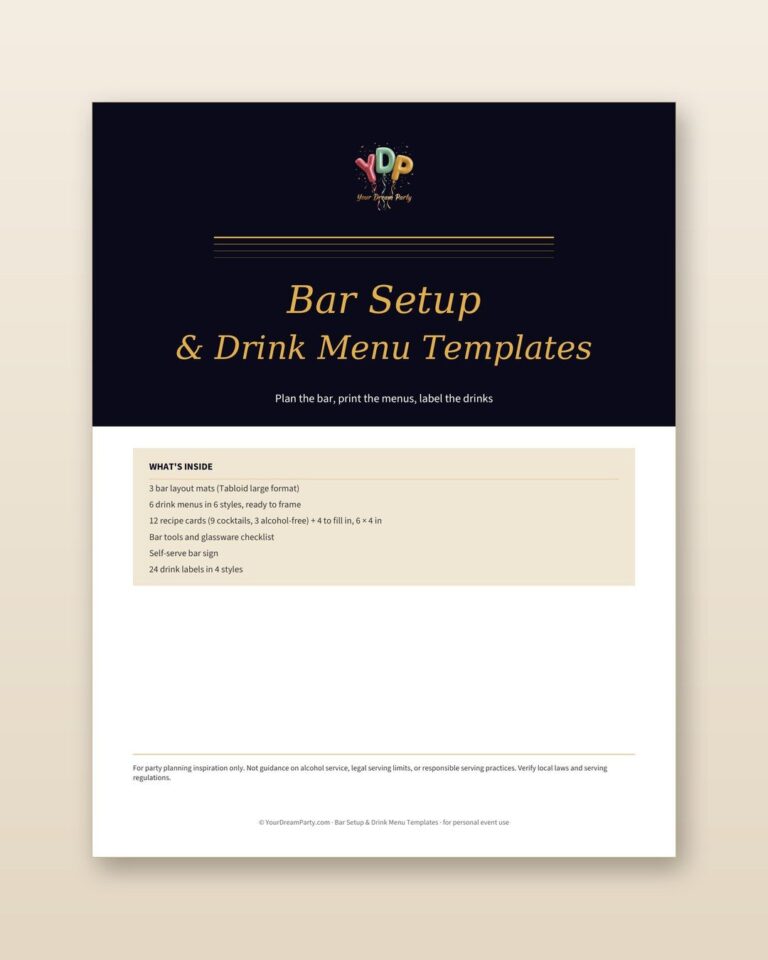
Bar Setup & Drink Menu Templates
- 3 bar layout mats: tabletop, dedicated and self-serve
- Mats print large (11 × 17 in) or fit to Letter
- 6 drink menus in 6 styles, ready to frame
- 12 recipe cards (9 cocktails, 3 alcohol-free) plus 4 blank, 6 × 4 in
What the Drinks & Beverage Calculator Builds for Your Bar
The results page lays out a full bar-quantity plan sized to your inputs. Each block turns your 5 or 6 answers into one concrete next step: the liquor-store run, the bar setup, or the day-of pour station.
Quantities grid. A row-per-category quantity sheet covering whichever of the 8 you ticked, up to 4: beer, wine, cocktails, spirits, mocktails, soft drinks, coffee and tea, champagne. It doubles as the liquor-store-and-supermarket reference for the shopping run, with each line in its own unit: bottles or cans, liters for spirits, drinks for cocktails and mocktails, and servings for coffee and tea.
Ice card. The ice estimate in pounds, with the arithmetic printed beside it, a pound per guest as the baseline, plus a quarter-pound per guest for a 5-to-6-hour event or a half-pound per guest when it runs all day. It works as the day-of note for whoever makes the ice run.
Glassware grid. A count per glass type, each with the formula behind it: wine glasses, pint glasses, rocks and shot glasses and highballs at 1.5 per guest for buffer; cocktail and rocks glasses and soft-drink cups at 2 per guest for rotation; mugs at 0.5 per guest, first-hour only.
Bar-tools checklist. The tools every bar needs, plus the extras each ticked category pulls in, so a cocktail-heavy bar comes back with more tools than a wine-and-beer one. It works as the pour-station setup reference for the bartender.
Cocktail recipes for your style. When you set a classic, tropical or holiday style at Step 6, the result carries a block of recipes in that style, ingredients and method for each, so the person pouring is not working from the bottle alone.
Printable bar plan. The full bar plan prints for the liquor-store run, the bartender, or the helper hand-off, covering the quantities grid, the ice card, the glassware counts, the tools checklist, and the recipes.
When Should You Run the Drinks & Beverage Calculator?
Three sample bars show the spread. Same 5 questions every time, plus the cocktail-style step whenever cocktails are ticked, but the order that comes back changes with your inputs.
Pattern 1, 20-guest cocktail evening, 2-hour window, wine and beer ticked, mixed crowd. For this one the calculator returns 2 quantity lines sized to 20 guests across a short window, 20 pounds of ice at the 1-pound baseline, 30 wine glasses and 30 pint glasses at the 1.5 buffer, and the bar tools those 2 categories call for. It suits an adult birthday or anniversary cocktail evening at home for 15 to 25 guests, where wine and beer cover the bar without a full cocktail station.
Pattern 2, 40-guest reception, 5-to-6-hour window, wine, cocktails, mocktails and soft drinks ticked, mixed crowd, classic cocktail style. Step up to this and you get 4 quantity lines instead of 2, 50 pounds of ice (40 at the baseline plus 10 for the longer window), 60 wine glasses, 80 cocktail and rocks glasses and 80 soft-drink cups at the 2-per-guest rotation rate, a longer tools checklist because cocktails pull in their own tools, and a block of classic cocktail recipes for the pour station. It fits a milestone birthday or anniversary reception for 30 to 50 guests, where plenty of non-drinkers on the list need the mocktail line carrying real weight.
Pattern 3, 60-guest wedding reception, all-day, wine, beer, cocktails and champagne ticked, mostly drinkers, signature cocktail style. At the top end the calculator returns 4 lines, 90 pounds of ice (60 at the baseline plus a 30-pound all-day buffer), 90 wine glasses and 90 pint glasses, 120 cocktail and rocks glasses, the full tools checklist, and, since the style is signature, a note on batching 1 or 2 house specials instead of a set of recipes. It suits a full-day wedding reception for 50 to 80 guests.
For more on hosting, the bar, and the dress code, the holiday party food and drinks guide goes deeper on the seasonal bar, the cocktail dresses for a Christmas party guide reads the cocktail dress code for a festive evening, and the wedding reception food guide sets the food service style the wedding bar runs beside.
Pick the Right Answers Before You Open the Calculator
A few inputs sharpen the numbers. Run through these before you start, since the calculator is only as precise as what you give it.
Pick the guest count against your live RSVP, not the invite list. A 50-person invite list with 38 confirmed yeses needs a 38-guest bar plan plus 10 percent of headroom (42 effective guests), not a 50-guest one. The calculator ties every quantity to the confirmed count, and the wrong number leaves you with either a cellar full of unopened wine (over-bought) or a panicked liquor-store run mid-party (under-bought).
Pick the duration honestly against the actual drinking window. A 5-hour event with a 90-minute seated dinner, where the wine pours at the table, counts as a 3.5-hour drinking window for the math, which puts it on 3 to 4 hours, not 5 to 6. Pick 5 to 6 hours against a 3.5-hour drinking window and you oversize every line the hours drive. Duration sets the pour rate, so be honest about how long guests will be holding a drink.
Pick the crowd preference that matches your guest list, not your own habits. "Mostly drinkers" against a room with 3 sober-curious guests and 2 designated drivers gives you an over-sized alcohol order; "mixed" or "mostly non-drinkers" moves that weight onto the lines those guests will actually reach for. Pull the setting from the RSVP responses where people flagged sobriety, not from how you would host it yourself.
Spend the 4 category slots deliberately. The cap is 4 out of 8, so every slot you hand to a category nobody drinks is a line missing somewhere else. A room that mostly drinks wine and soft drinks is better served by 2 solid lines plus coffee and tea than by ticking spirits and champagne because they sound like a proper bar.
Pick a recipe style even if the cocktails are simple. Step 6 appears once cocktails are ticked, and classic, tropical and holiday each fill the recipe block. Pick signature and you get a batching note with no method behind it, which puts whoever is pouring back on their phone mid-party looking up ratios.
Run the calculator twice if the RSVP is uncertain. A 50-person invite with a wide RSVP curve (anywhere from 30 to 45 yeses) is worth running at both ends, so you can pick the number that splits the difference. Keep the unopened-bottle return policy in mind for the gap between them.
Save your bar plan before the liquor-store trip. The printout is the cleanest reference for the liquor-store run, the supermarket trip, the helper setting up the day-of station, or the bartender. Print it for the planning binder, forward the emailed plan to whoever is placing the liquor-store order, and keep a copy on your phone for the helper running the bar station.
Frequently Asked Questions
Is the Drinks & Beverage Calculator actually free?
Yes. The calculator, the quantities grid, the ice card, the glassware counts, the bar-tools checklist, the cocktail recipes, and the printable bar plan cost nothing and require no signup. The optional upgrade is the Bar Setup & Drink Menu Templates ($12.00), which carries the result forward with 3 bar layout mats, 6 drink menus, 12 recipe cards and drink labels in 4 styles.
How much alcohol do I need for a party?
Alcohol sizing depends on the headcount, the duration, and how the room drinks. With wine and beer ticked for a mixed crowd, the calculator puts a 30-guest evening of 3 to 4 hours at 6 bottles of wine and 38 beers; the same 30 guests over 5 to 6 hours come to 9 bottles of wine and 55 beers. Tick spirits as well and they take a share of that same total, so the wine and beer lines shrink. The calculator runs the per-category math for your own headcount, duration, categories and crowd.
Does the calculator handle mocktails and non-alcoholic options?
Yes. Mocktails is one of the 8 drink categories in its own right, so tick it at Step 4 (alongside up to 3 others) and it comes back with its own quantity line, sized to your headcount and duration, and its own glassware count. The two are sized independently rather than matched one for one: mocktails draw highball glasses at 1.5 per guest, while cocktails draw cocktail and rocks glasses at 2 per guest for rotation. Setting the crowd preference to mostly non-drinkers or family with kids is what shifts the weight of the drinks toward that end of the bar.
How much ice do I need for a party?
The calculator works ice at a pound per guest as the baseline, adds a quarter-pound per guest when the duration is 5 to 6 hours, and adds a half-pound per guest when it is set to all day. A 30-guest evening comes to 30 pounds; the same 30 guests across a full day come to 45. Ice is usually bought in 10-pound bags at the supermarket or liquor store the morning of the event, so round up to whole bags.
How much wine should I buy per guest?
Wine pour rate scales with the duration and with how the room drinks. With wine as the only alcohol for a mixed crowd, a 3-to-4-hour event runs about 1 bottle per 2 guests (5 glasses to the bottle, about 2.25 glasses per guest); a 5-to-6-hour event runs closer to 1 bottle per 1.5 guests (about 3.25 glasses per guest). Tick wine at Step 4 and the calculator sizes that line against your headcount, your duration, your crowd preference, and the other alcohol lines sharing the total.
Does the calculator work for a dry event?
Yes, though there is no dedicated dry-event setting. Leave beer, wine, cocktails, spirits and champagne unticked at Step 4 and pick only from the non-alcoholic categories, mocktails, soft drinks, and coffee and tea. Soft drinks and mocktails then share the whole drinks total for your headcount and duration, while coffee and tea stays a first-hour count that the hours do not change.
How do I serve a mix of drinkers and non-drinkers?
Tick both cocktails and mocktails at Step 4 and set the crowd preference to mixed, so both lines come back sized against the room rather than one being an afterthought. Set up a single bar station with the cocktail spirits on one side and the mocktail bases on the other, with shared garnishes (citrus, herbs, ice) in the center. Both categories carry their own glassware count on the result, so neither side runs short.
Can I save or share the bar plan?
Yes. The bar plan prints for the liquor-store run, the supermarket trip, the bartender, or the helper hand-off, and works as a single-glance reference covering the quantities grid, the ice card, the glassware counts, the tools checklist, and the cocktail recipes.
Ready to Size the Bar Order?
Six steps in the calculator above give you a quantities grid across the categories you picked, an ice card with the formula shown, a glassware count per drink type, a bar-tools checklist, cocktail recipes when you pick a classic, tropical or holiday style, and a printable bar plan. The Bar Setup & Drink Menu Templates below carry the result forward with 3 bar layout mats, 6 framed-menu designs, 12 recipe cards and a bar tools checklist.
This page contains affiliate links to Amazon and other retailers. As an Amazon Associate, we earn from qualifying purchases at no extra cost to you. This helps us keep all our tools free.
Results generated by this tool are for planning and inspiration purposes only. Estimates are based on general guidelines and may vary depending on your specific circumstances. Always verify with your suppliers before making purchasing decisions.