How Does the Party Budget Calculator Work?
The calculator walks you through 5 quick rounds of questions. Every answer after the event type feeds the same breakdown, so the numbers fit the party you are actually planning, not a generic 50-person template. The whole thing takes under 2 minutes on a phone or laptop, with no signup or email needed first.
Step 1, event type. Pick the celebration type (birthday, baby shower, wedding, bachelorette, kids party, anniversary, graduation, milestone birthday, holiday, other). Your choice names the event on your result, and a kids party also keeps alcohol off the shopping list and swaps the decor candles for LED tea-lights. The per-guest starting costs come from your budget tier.
Step 2, guest count. Pick a range (Under 15, 15-25, 25-40, 40-60, 60-100, 100-200, 200+) or type an exact number between 5 and 500. Your headcount lifts or lowers the 8 category totals, though each category keeps a set minimum for small groups.
Step 3, budget tier. Pick a tier, priced per guest (Budget-Friendly about $11 to $41, Mid-Range $20 to $74, Premium $36 to $132, Luxury $61 to $226). That one pick sets the per-guest multiplier behind all 8 categories, so a small party, where the category minimums lift the total, can land above the range on the card, and a note on your result says when it does.
Step 4, priority categories. Pick 1 to 3 priorities from the 8 categories (food and catering, drinks and bar, decorations, entertainment, photography, favors and gifts, venue and setup, cake and dessert). Whatever you choose gets a 25 percent bump in the budget and a badge on your results table.
Step 5, venue and supplies. Three quick questions here: your venue type (home, rented hall, garden, restaurant, beach or park), how long the event runs (2 hours or less, 3-4 hours, 5-6 hours, all night), and what you already own (starting from scratch, some basics, most things, fully equipped). Together these answers can move the total up or down to match the setup you actually have.
Step 6, get results. Hit calculate and you get an 8-row breakdown table, 4 shopping-estimate cards, a per-guest read on your spending, and a contingency line for surprises. Share it, print it, or copy the whole breakdown out as plain text.
🛒 As an Amazon Associate, we earn from qualifying purchases, at no extra cost to you.
Party Decoration Kit
Shop on AmazonBalloon Garland Kit
Shop on AmazonDisposable Party Tableware
Shop on AmazonWhy the Party Budget Calculator Beats a Blank Spreadsheet
A blank spreadsheet is the cheapest planning tool going, but it hides real costs. Start from a blank sheet and you'll usually undercount 2 or 3 categories, overspend on a fourth, and skip the contingency line completely. The calculator puts 7 questions to you before it shows a single number, so those gaps get caught while you answer, not when the bill lands.
Here are 5 reasons people come back to it, party after party.
- Categories already built in. The 8 categories cover everything a typical party needs (food, drinks, decor, entertainment, photography, favors, venue, cake), and each one runs on a set cost-per-guest rate built into the tool rather than a guess. On a blank sheet you'd have to invent those numbers yourself, and that is where the guessing begins.
- Scaling handled for you. Switch the budget tier from budget to mid, premium, or luxury and all 8 categories adjust at once, with no table to rebuild. A single tier multiplier sits behind all 8 rows, so one pick moves the lot on the next calculate.
- Priority bonus built in. Choose 3 priorities and each of those categories comes out 25 percent higher, while the rest shave 5 percent, never dropping below their minimum spend. That mirrors how real parties go: love photography, and you fund it and trim elsewhere; want a fuller tablescape, and decor gets the extra. The calculator does that shift for you automatically.
- Venue and supplies handled for you. A backyard where you already own most of the gear sits at a completely different price from a rented hall where you start with nothing. The calculator works your venue and supplies into the total on its own, so you never do the math twice.
- A cushion built in. Every result carries a 5 percent contingency row for the surprise that always shows up (extra ice, a last-minute rental, a tip you forgot). Skip that cushion, as most spreadsheets do, and the overage has nowhere to land but the final bill.
It works hand in hand with the Party Planning Timeline, which counts your tasks back from the party date across 8 milestones, or 6 for a simple party, and the Guest List & RSVP Tracker, which keeps your headcount tight as the day nears.
Party Budget Tracker
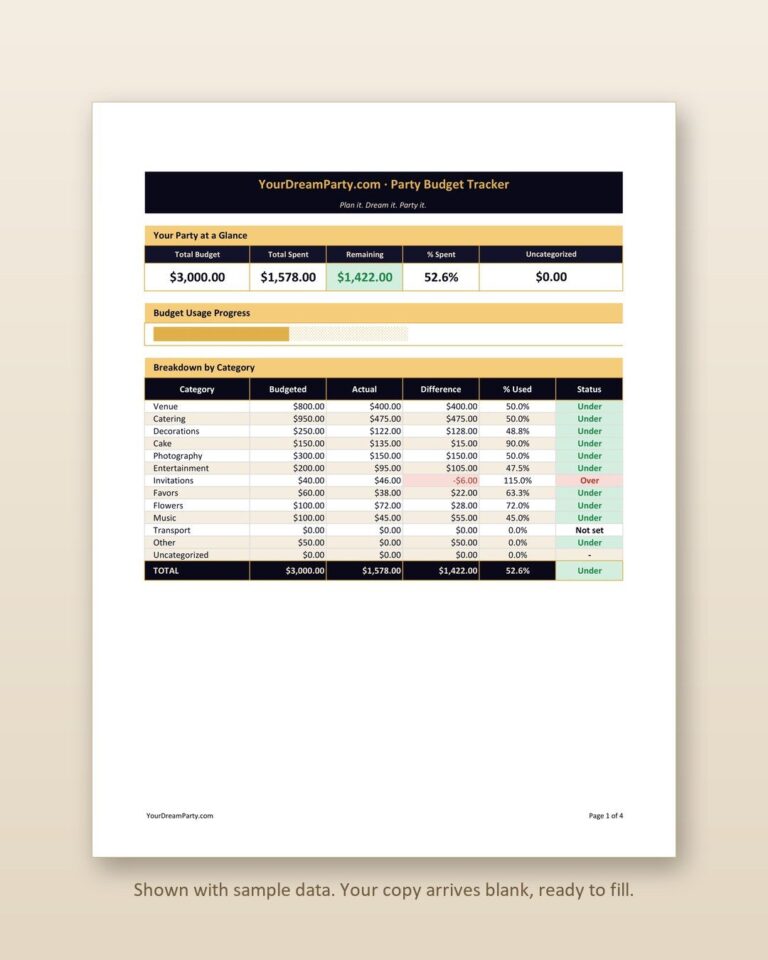
- 12 budget categories, from Venue and Catering to Favors and Transport
- Items log with 40 rows: date, item, category, amount, vendor, notes
- Category dropdown, so every purchase counts towards a total
- Dashboard: budget, spent, remaining, % used and a progress bar
What the Party Budget Calculator Builds for Your Event
When you finish, the results page lays out a full breakdown shaped by your answers. Each part is ready to print and shop from on the spot, with no extra step in between.
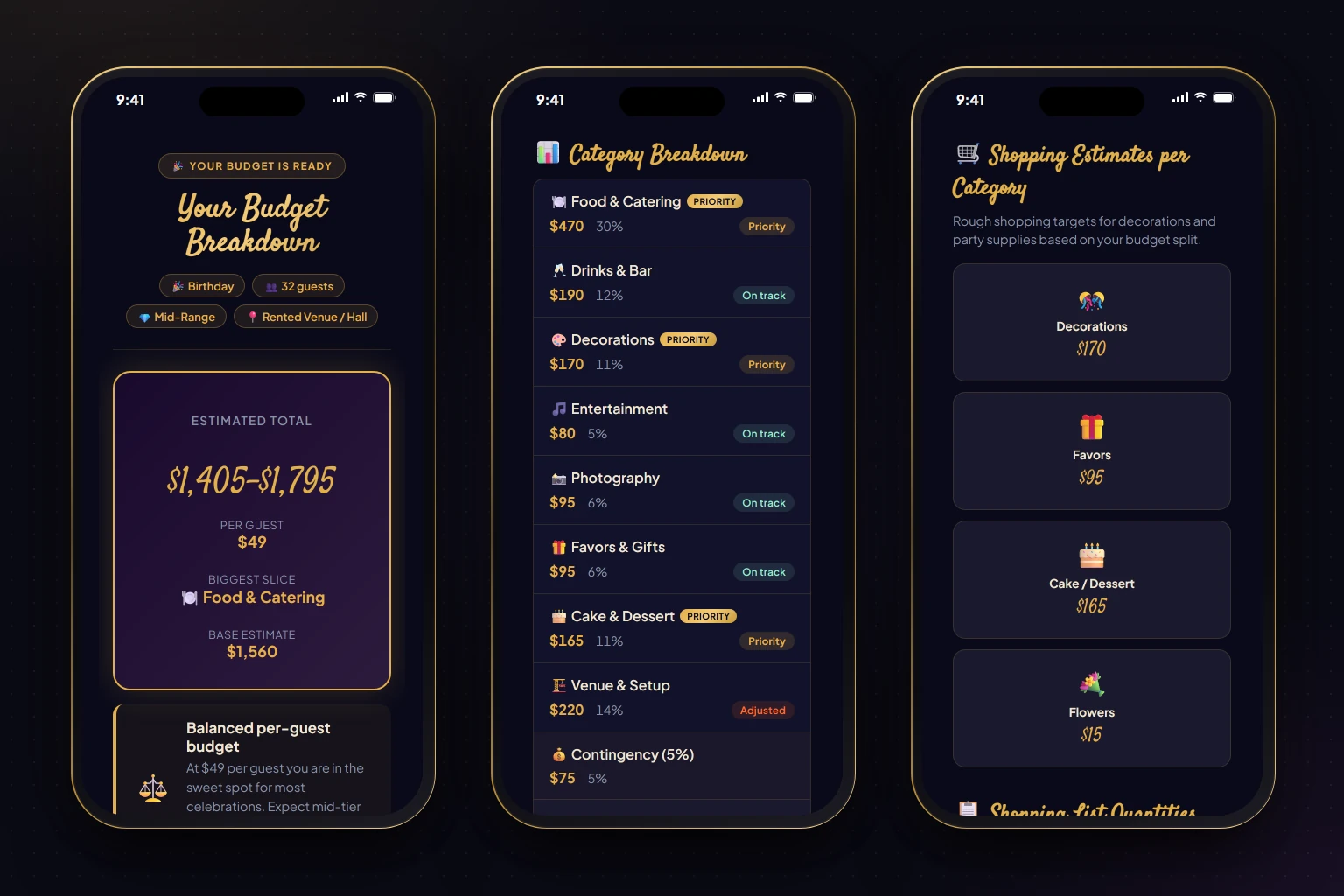
Per-guest spending banner. A banner high on the result reads your per-guest number and calls it lean, balanced, comfortable, premium, or luxury. When 4 or more of the 8 categories sit at their minimum spend, it says instead that the minimums set much or all of the total, and still shows your per-guest figure. It is the quickest way to see whether your numbers are realistic for the celebration you have in mind.
Eight-row category breakdown table. Each of the 8 categories gets a row with its subtotal, its share of the total, and a priority badge if you marked it in Step 4. Under those 8 rows sit a 5 percent contingency line and a total row, so the bottom-line figure already has the cushion folded in.
Four shopping-estimate cards. Decorations, favors, cake, and flowers each get a card showing the dollar figure that category can absorb, with flowers carved out of the decor line. These turn the table's numbers into things you can actually put in a cart.
A shopping list built around what matters to you. Each priority you picked gets its own section of counts worked out from your guest count, and the sections land in the tool's own order: food, drinks, decor, favors, cake, entertainment, photography, venue.
A footnote naming your adjustments. One line below the table spells out your tier plus the exact venue, duration, and supplies percentages that moved your numbers, and closes by telling you to hold 10 to 15 percent back.
The Excel tracker upgrade. The Party Budget Tracker Excel sits right under the shopping list, one click away, for anyone who wants a spreadsheet to log real spending as receipts come in through the run-up.
Pick the Right Answers Before You Calculate
A few answers make the breakdown sharper. Run through these first, because the result can only be as accurate as what you feed in.
Nail down the guest count first. That number feeds every category, and being off by 10 here moves the food line by roughly $100 at the mid-range tier. Round to the nearest 5 while the RSVPs are still trickling in.
Pick the budget tier honestly. There is no separate total to type in; the tier is the only spending dial, and the estimate falls out of it. Its 4 settings run Budget-Friendly, Mid-Range, Premium, and Luxury. Choose the tier that matches how you want the day to feel, not the cheapest one on the list.
Mark only your real top 3. The tool caps you at 3 and grays out the rest, so there is no way to spread the 25 percent thinner. Pick the 3 you truly care about (often food, photography, and decor for a milestone birthday) and let the rest take a slight trim.
Be honest about supplies on hand. "Some basics" and "most things" each take a real bite out of your total, so answer it honestly. If you have hosted twice in the past 12 months, "most things" is probably right; if this is your first big party, go with "some basics" rather than pretending you own the rental table you have not bought yet.
Set the length to match your real plan. A 3-to-4-hour cocktail evening lands about a quarter under an all-night party at the same headcount, since the all-night setting adds 30 percent across the board. Pick the length your invitation actually promises, not the one you secretly hope guests stay for.
Save the result, even before the party. Copy, print, or email it, then enter its figures in the Party Budget Tracker Excel, where you can log real spending against the calculator's estimate as receipts come in. Seeing where the estimate and the real spend differ afterward is the most useful thing you will learn for the next party you host.
Frequently Asked Questions
Is the Party Budget Calculator actually free?
Yes. The calculator, the results page, the printable summary, and the shopping list all cost nothing and need no signup. The paid add-ons are optional, led by the Party Budget Tracker Excel ($7.00), which gives you a live spending tracker to update through the run-up.
Can I use the Party Budget Calculator on my phone?
Yes. The calculator is designed for phone screens first, and it reflows neatly on tablet and desktop too. It works as comfortably on the couch or the kitchen counter as it does at a desk.
How accurate are the party budget calculator estimates?
Each of the 8 categories carries its own fixed per-guest cost, and the budget tier you pick is what scales all of them. They are planning ranges, not firm quotes: answer honestly (a real guest count, the right tier, your true 3 priorities) and the breakdown makes a sound planning frame; guess at the answers and the gap grows fast.
Does the Party Budget Calculator cover non-birthday events?
Yes. The event-type picker covers birthdays, baby showers, weddings, bachelorette parties, kids' parties, anniversaries, graduations, milestone birthdays, holidays, and a flexible "other" option. Your pick badges the result, and a wedding or anniversary moves a flower bouquet up the Amazon picks underneath it, though the per-guest costs behind the table are the same 8 numbers whichever event you choose.
Can I save or share my Party Budget Calculator result?
The results page comes as a printable summary, an Email My Results button, and a share message with a link to the calculator. The share message carries your total range and guest count only, so reach for Copy All when a partner, planner, or co-host needs the whole breakdown.
What if I want to adjust the budget after the calculator runs?
Copy the breakdown out first, then hit Start Over and run it again on the new tier. That clears your answers, so weighing budget against mid, or mid against premium, means re-picking them, and you compare the 2 copies.
How does the Party Budget Calculator handle a venue I have not booked yet?
Pick the venue type closest to your likely choice (rented hall if you are torn between 2 halls, garden if you are leaning toward the backyard). Venue moves the whole estimate, though: a rented hall adds 15 percent, a beach or park 20 percent, and a restaurant takes 20 percent off, well past the 5 percent cushion.
Ready to Build Your Party Budget?
Scroll up, work through the calculator's 5 question screens, and in under 2 minutes a blank-page budget turns into a plan you can trust: an 8-category breakdown, 4 shopping cards, and a printable result you can carry into the Excel tracker for the rest of the run-up. The Party Budget Tracker Excel below is where you enter that result and follow your real spending, for anyone who wants the upgrade.
This page contains affiliate links to Amazon and other retailers. As an Amazon Associate, we earn from qualifying purchases at no extra cost to you. This helps us keep all our tools free.
Results generated by this tool are for planning and inspiration purposes only. Estimates are based on general guidelines and may vary depending on your specific circumstances. Always verify with your suppliers before making purchasing decisions.