How Does the Party Planning Timeline & Checklist Work?
The timeline asks 4 quick questions and then opens into a milestone-by-milestone countdown. Event type, event date, guest count and complexity are what it wants, so the milestone dates count back from the day itself and the wording feels right for the celebration you are actually planning. Setup takes under 90 seconds; the planning itself plays out over the countdown weeks as you come back to check tasks off.
Step 1, event type. Pick from 8 categories (birthday, baby shower, wedding, bachelorette, graduation, anniversary, holiday, general celebration). Your choice tunes the task wording (a wedding milestone mentions the ceremony and reception venues and the dress fittings; a baby shower milestone mentions the registry and the cake order), the task count (a wedding template runs 38 tasks; a general celebration runs 31), and the day-of tasks on the final milestone.
Step 2, event date. Pick a date from the calendar picker (minimum today, maximum 2 years out). Every milestone date is worked out from this one. The timeline sets each milestone by counting back from the event date (8 Weeks Out = event date minus 56 days, 6 Weeks Out = minus 42 days, 4 Weeks Out = minus 28 days, 2 Weeks Out = minus 14 days, 1 Week Out = minus 7 days, 3 Days Out = minus 3 days, Day Before = minus 1 day, Day Of = the date itself). If the event date is less than 8 weeks out, the early milestones still render, each carrying a note saying how many days ago its date passed and to catch up on anything still open.
The 8 milestones. On the Standard and Elaborate settings the countdown runs across 8 named milestones, each with its own accent color and its own task block; Simple keeps only the 6 that sit inside 4 weeks. 8 Weeks Out is Setting the Stage; 6 Weeks Out is Booking and Invitations; 4 Weeks Out is Decorations and Details; 2 Weeks Out is Logistics and Confirmations; 1 Week Out is the Final Countdown; 3 Days Out is Almost There; Day Before is Final Preparations; Day Of is It's Party Day. On Standard, each block holds 3 to 6 tasks pulled from your event type's own template, and your guest count can add 1 or 2 more to 1 Week Out, for 31 to 40 across the whole countdown, or 48 to 59 once Elaborate adds its detail tasks.
Complexity setting. Step 4 decides how much of the countdown you get. Simple keeps only the 6 milestones inside 4 weeks, drops the template's optional tasks, and closes 4 Weeks Out with the budget, the guest list and any booking a later task depends on. Standard opens all 8 with the full template. Elaborate opens the same 8 with extra detail tasks in every block and, when the party is more than 8 weeks off, pins a note to the 8 Weeks Out block telling you that you can start its tasks now.
Auto-save and milestone collapse. Every task you check off saves to browser storage under the tool's own key. The timeline remembers your event date, event type, guest count, complexity, and checked-off tasks across sessions, so closing the tab and coming back the next day loses nothing. When every task in a milestone is checked, that milestone collapses itself and picks up a green Done badge, so your focus stays on the milestones still ahead.
🛒 As an Amazon Associate, we earn from qualifying purchases, at no extra cost to you.
Party Planning Notebook
Shop on AmazonPlanning Binder Organizer
Shop on AmazonLabel Maker
Check Price on AmazonWhy the Party Planning Timeline & Checklist Beats a Scribbled List
A single sheet of paper with handwritten tasks is where many people start, but it hides real costs. Plan from a scribbled list and you'll often miss which task depends on which, forget the 4-weeks-out cake call until 2 weeks out, and lose the list entirely the week of the event, right when the clutter peaks. The timeline fixes all of that at once, pinning every task to a dated milestone and saving what you have checked, so nothing rides on a sheet of paper surviving the final week.
It earns a place in the plan for 5 reasons, celebration after celebration.
- The date math done for you. A scribbled list shows tasks but not deadlines; the timeline counts each milestone date backward from your event date, so you see exactly which week each block falls in. The dates hold the deadline pressure, so you do not have to.
- A Simple setting that stops you over-planning. The full template looks intimidating on a low-key party. Pick Simple at Step 4 and the countdown drops to the 6 milestones inside 4 weeks and keeps only the template's critical and important tasks, plus the budget, guest list and bookings they depend on, which is how a 38-task wedding plan becomes a 30-task one. A shorter list is easier to carry through to the party.
- Auto-save across sessions. Planning a celebration takes weeks, not one sitting. The timeline saves your event date, event type, and checked-off tasks to browser storage on this device. Come back a day, a week, or a month later and your progress is right where you left it. Because it saves to your browser, switching devices means answering the 4 questions again, and your ticks stay on the first device, but the plan rebuilds in under 90 seconds.
- Focus that follows the countdown. As the weeks pass and milestones fill up, the timeline auto-collapses the finished ones and marks each with a green Done badge. Your focus stays on the milestones that are active and coming up, so you never scroll past finished work to reach the tasks now due. And when every task is checked, a confetti burst marks the planning cycle as truly done.
- A day-of checklist built in. The final Day Of milestone is a short list of 2 to 7 tasks written for your event type; a baby shower's covers the last setup pass, putting food out 30 minutes before guests arrive, the welcome, the games, and the photo moment. It lives in the same place as the rest of the planning, so the morning of the event opens to a checklist instead of a panic.
The timeline works well alongside the Party Budget Calculator for splitting the planning across budget categories, the Guest List & RSVP Tracker for the RSVP follow-up the 2-weeks-out milestone asks for on every event type but bachelorette, and the Last-Minute Emergency Planner if your event is under 72 hours away.
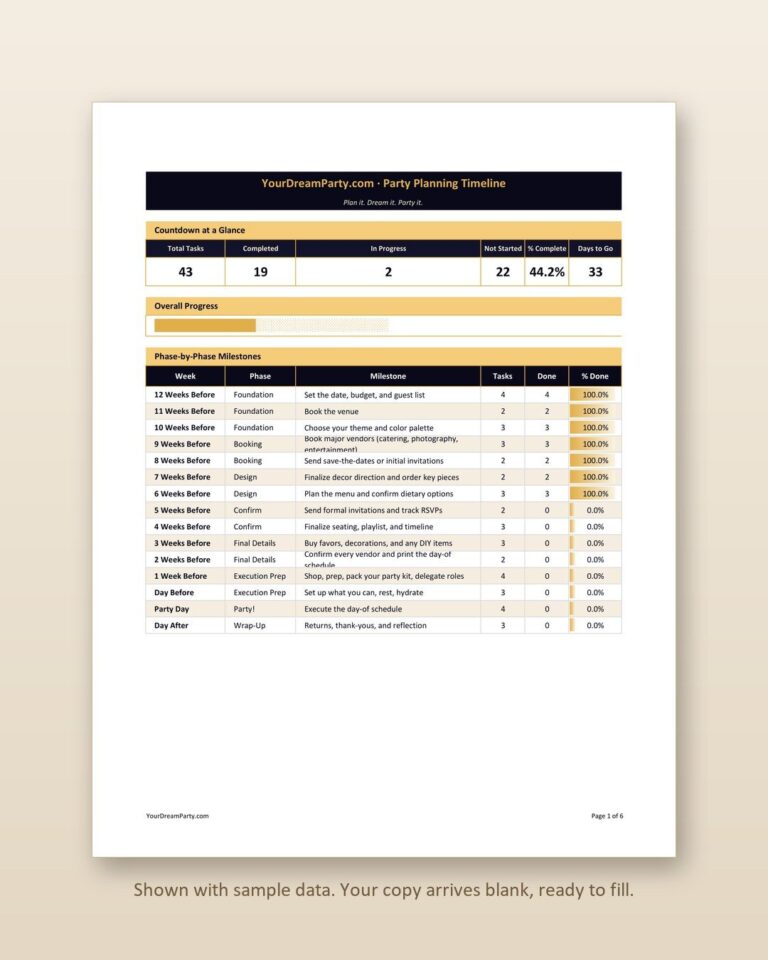
Party Planning Timeline
- 43 starter tasks across 15 phases, 12 weeks before to the day after
- Suggested priorities, Owner and Notes columns; room for 250 tasks
- Enter your party date and every task gets a due date
- Overdue tasks turn red; tasks due within a week turn amber
What the Party Planning Timeline & Checklist Builds for Your Countdown
The timeline view gives you one complete plan, built from your 4 answers. Each milestone block is a phase of the countdown, spelled out as a concrete next step you can act on.
Milestone-by-milestone task cards. Each milestone shows up as a card with its date, its accent color, and its task block. Every task has its checkbox, its plain-language label, and a priority pill (CRITICAL, IMPORTANT, or OPTIONAL), and the card header keeps a running count like 3 / 5. You work through each card as its week arrives, checking tasks off as you finish them.
Progress indicator at the top. A single-line progress bar shows how many tasks you have checked, with the milestone tally and a percentage sitting on the same row. It is a reassuring thing to glance at during the planning weeks; seeing 20 of 33 tasks done at 4 weeks out feels on-track even when the weeks ahead look busy.
The next milestone opens itself. The card the timeline expands on load is the first one whose date has not passed, so the block whose week has arrived is the one already on screen. Any milestone whose date has slipped by carries a note saying how many days ago it fell and to catch up on anything still open.
Day-of checklist. The Day Of milestone is a 2-to-7-task list written for your event type: a birthday closes on the final cleanup, food out 30 minutes ahead, candles on the cake and enjoying it; a wedding closes on hair and makeup, dressing with the wedding party, the ceremony itself, and stealing a moment together. It sits right alongside the planning, so the morning of the event opens to a checklist instead of a panic.
Completion celebration. When every task in every milestone is checked, a celebration card opens under the milestone list with a "You're All Set" message, a stats row counting the tasks completed, the milestones cleared and your event by name, and a 40-piece confetti burst. It marks the planning cycle as truly closed.
Straight back into the plan. Come back to the timeline after an earlier session and it reopens on your built countdown with every tick still in place, skipping the hero screen. Starting fresh is the Start Over link at the foot of the results, which asks you to confirm before it clears this device.
Email-the-plan action. The Email My Timeline button in the action bar under the results sends a snapshot of where you stand: event type, event date, guest count, complexity, the milestone and task totals, and how many you have checked. Use it to keep a co-host, a partner, or a wedding coordinator up to date the week of the event; the tasks themselves stay in the timeline.
The Excel planner upgrade. The Party Planning Timeline (Excel) sits right under the milestone list: an editable Excel template with 43 starter tasks across 15 phases, each one dated once you type in your party date, custom-task rows for event-specific additions, and a color-coded progress tracker, for anyone who wants an offline planner alongside the live tool.
Use the Timeline Across Common Planning Situations
Three sample situations follow. Each changes the event type and how far out the date is, and those 2 answers send the plan in different directions.
Pattern 1, wedding, event date 8 weeks out, full planning window available. All 8 milestones carry live dates, the 8 Weeks Out card is the one the timeline expands for you, and its tasks are the wedding template's own (both venues confirmed, guest list settled with both families, officiant locked in, key vendors held, fittings scheduled). With a full window, you can clear that card's 5 tasks in the first session, then come back weekly to clear each upcoming milestone. The completion celebration arrives on the morning of the wedding with every one of its 38 to 40 tasks checked, or 57 to 59 on Elaborate.
Pattern 2, birthday party, event date 3 weeks out, compressed planning window. The 8 Weeks Out, 6 Weeks Out and 4 Weeks Out cards all sit past their dates and say so, the 2 Weeks Out milestone is the one the timeline expands for you, and your attention goes to that block and the 1 Week Out one behind it. With a tight window, picking Simple at Step 4 keeps only the template's critical and important tasks in each block; the timeline becomes a triage tool rather than a leisurely countdown.
Pattern 3, baby shower, event date 5 weeks out, mid-window planning. The 8 Weeks Out and 6 Weeks Out cards both read as past their dates; the 4 Weeks Out milestone is where the timeline opens you up, and the countdown runs from there. This is a common place to start when the date was confirmed late, the venue locked in recently, or you took over the planning from someone else. The timeline picks up cleanly from the 4 Weeks Out milestone on.
To go further, the party planning checklist guide adapts one master checklist to each event type.
Pick the Right Answers Before You Start
A few choices make the countdown fit your party. Run through these before you begin.
Enter the date the party actually falls on, not the date you want to be ready by. It is tempting to enter a date 1 week early to give yourself margin, but then the milestones fire too soon and the countdown reads wrong. The Day Of checklist only makes sense on the actual morning of the celebration. Trust the date math instead of padding the timeline.
Pick the event type that best fits the celebration, not the closest formal label. A casual at-home get-together that is not specifically a birthday or a wedding works best under the general-celebration category, which keeps the language neutral. An informal baby shower should still pick baby-shower, since the milestone tasks mention the registry, the cake order, and the advice cards and gift-opening order that other categories miss.
Start planning once the date is set, not a week later. The 8 Weeks Out milestone is the first block on the Standard and Elaborate plans, so the foundational tasks are waiting the moment you enter the date. Starting early makes for a calmer planning rhythm than waiting for the 6-weeks-out milestone; the early milestones carry the bookings everything else waits on, so a little effort now pays off later.
Let the open card set your daily focus. Each milestone block holds 2 to 13 tasks, depending on the event and the setting, and the timeline expands the one whose date is next, so the week in front of you is already the week on screen. Clear that card until its counter reads 5 / 5, then leave the rest closed; scrolling ahead is how a countdown starts to feel like a backlog.
Check tasks off the moment you finish them, not in batches. The auto-save fires on every check, so the timeline always reflects where you truly are. Saving them all up until the end of the week creates a gap between what you have actually done and what the timeline thinks, and the plan the timeline reopens with the next morning is stale. Check as you go.
Print the Day Of checklist the week before the event. The Day Of milestone is the one thing you will reach for most during the celebration. Print sends every milestone to paper with Day Of as the last block, so print the week before, hand a copy to a co-host or helper, and put it somewhere visible on the morning of the event. It stays useful even after the timeline closes, if the celebration runs across several days.
Frequently Asked Questions
Is the Party Planning Timeline & Checklist actually free?
Yes. The timeline, every milestone, the 21 to 59 tasks across the countdown, the calendar export, the progress indicator, the Day Of checklist, the completion celebration, the auto-save across sessions, and the email-the-plan action all cost nothing and need no signup. The optional add-ons are paid printables, led by the Party Planning Timeline (Excel) at $7.00, a separate editable Excel template with its own dated tasks, custom-task rows, and a color-coded progress tracker, for when you want an offline planner alongside the live tool.
How far in advance should I start planning a party?
The timeline supports event dates up to 2 years out, though a window between 8 weeks and 3 months keeps every milestone live without the early weeks going slack. The 8 Weeks Out milestone is the natural starting point for a major celebration (wedding, milestone birthday, baby shower, anniversary); 3 to 4 weeks out is plenty for a casual celebration or a smaller gathering. If the event date is less than 8 weeks away, the timeline dates the early milestones into the past and flags each as overdue.
Can I use this timeline for any type of event?
Yes. The Step 1 event-type picker covers 8 categories (birthday, baby shower, wedding, bachelorette, graduation, anniversary, holiday, general celebration). The general-celebration option catches anything that does not fit the 7 named categories (retirement parties, engagement parties, milestone career events, family reunions, school hosting events). The task wording adapts to the category, so the milestone blocks read right for whichever celebration you are planning.
Does the timeline save my progress?
Yes. Every task you check off saves to browser storage under this tool's own key. The timeline keeps your event date, your event type, and your checked-off tasks across sessions, so closing the tab and coming back the next day loses nothing. On your return the timeline reopens straight onto the built countdown, so you land exactly where you left off.
What milestones does the timeline cover?
Eight milestones across the countdown on the Standard setting: 8 Weeks Out (Setting the Stage), 6 Weeks Out (Booking and Invitations), 4 Weeks Out (Decorations and Details), 2 Weeks Out (Logistics and Confirmations), 1 Week Out (Final Countdown), 3 Days Out (Almost There), Day Before (Final Preparations), Day Of (It's Party Day). Each holds 3 to 6 tasks from your event type's template, 31 to 38 in all before guest count adds up to 2 more, and Simple cuts the set to the 6 milestones inside 4 weeks.
Can I export or email the timeline?
Yes. The Email My Timeline button in the action bar under the results sends where you currently stand: event type, event date, guest count, complexity, the milestone and task totals, and your checked count. Use it to update a co-host, a partner, or a wedding coordinator; the email leaves out the task list. For the tasks, Export .ics downloads a calendar file with each milestone as an all-day event, and Print or Copy All gives you every task. The Party Planning Timeline (Excel) upgrade is a separate editable Excel template if you prefer to plan offline.
What happens when I check every task off?
The timeline opens a completion celebration under your milestones with a "You're All Set" message, a stats row counting tasks completed, milestones cleared and your event by name, and a 40-piece confetti burst. It marks the planning cycle as truly closed, and it means the morning of the event opens to enjoyment instead of planning.
Ready to Start the Countdown?
Trade the vague mental checklist for a countdown of up to 8 milestones that holds together from the first task to the day of, which is exactly what the Party Planning Timeline & Checklist gives you. Under 90 seconds to set up, 6 or 8 milestones unfolding across the countdown weeks, 21 to 59 tasks drawn from your event type and guest count, a progress indicator, a calendar export, an email action, and a completion celebration that closes out the planning cycle. The Party Planning Timeline (Excel) below adds an editable Excel template dated from your party date and a color-coded progress tracker, if you also want an offline planner alongside the live tool.
This page contains affiliate links to Amazon and other retailers. As an Amazon Associate, we earn from qualifying purchases at no extra cost to you. This helps us keep all our tools free.
Results generated by this tool are for planning and inspiration purposes only. Estimates are based on general guidelines and may vary depending on your specific circumstances. Always verify with your suppliers before making purchasing decisions.