How Does the Party Name & Hashtag Generator Work?
The generator runs 5 short steps and puts your answers together when you press Generate, so the final naming bundle fits the event you are actually planning rather than a generic "#HappyBirthday". The full session takes under a minute on a phone or laptop, with no signup or email gate before the result.
Step 1, occasion. Pick from 10 event types (birthday, wedding, baby shower, bachelorette or bridal shower, graduation, anniversary, engagement, retirement, housewarming, general celebration). Your pick supplies the event word used in many of the names and hashtags ("Birthday", "Wedding", or #SaraBday in a tag), while the tone of the list comes from the vibe preset you choose later.
Step 2, guest of honor. Enter the name the celebration belongs to. For couples, separate the two with a comma ("Sara, James") and the generator treats both names together. That name anchors every suggestion it builds, so it is the single input doing the most work.
Step 3, age or milestone. Optional. Enter the number if the event has one, and a milestone-themed name joins the list ("Sara's 30th Birthday" on the classic vibe), along with hashtags that carry the number. Leave it blank and the generator skips that family entirely. Note that the hashtags stay free of year references either way, so they read the same 12 months later.
Step 4, vibe. Pick from 6 presets (classic, punny, sentimental, cheeky, elegant, bold). The vibe is what separates "A Celebration for Sara" from a wordplay build or a sentimental one, so it steers both the name list and the hashtags that follow from it.
Step 5, review and generate. Check the summary card of your 4 answers, the occasion, the guest of honor, the age or milestone, and the vibe, then hit Generate to build the names and hashtags.
🛒 As an Amazon Associate, we earn from qualifying purchases, at no extra cost to you.
LED Neon Sign
Check Price on AmazonMarquee Letter Lights
Check Price on AmazonFelt Letter Board
Check Price on AmazonWhy the Party Name & Hashtag Generator Beats a Social Media Hashtag Search
A hashtag search on social media is a common starting point for hosts looking for an event tag, and it turns up strings other people already use for unrelated events. The generator builds the bundle from your own guest-of-honor name and event vibe, so the hashtag is built around a name you chose instead of a borrowed string, the party name matches it, and any banner you order afterward can carry the same words across the whole event.
Four reasons hosts run the generator before the invitation goes out.
- Names and hashtags from the same root. Plenty of hosts write the invitation copy 6 weeks out and pick a hashtag the night before the event. The two end up disconnected: the invitation says "Sarah Turns 30" and the hashtag says "#SarahsBigDay". The generator builds the name list and the hashtag list off the same guest-of-honor name and the same vibe, so what goes on the invitation and what goes under the photos belong together. Guests notice the coherence even when they cannot articulate it.
- Every hashtag capped and evergreen. Long strings get truncated in a busy discovery feed, and a hashtag carrying the year stops making sense the moment the photos get reshared. Every suggestion the generator returns comes in at 30 characters or less and carries no year reference at all, so the one you print stays typable and stays current.
- Fifteen options, not one. The generator returns 5 names and 10 hashtags in a pass, and either list regenerates on its own button if none of them land. Hosts who get one option usually settle for it without testing; hosts who get a spread try them on the friend group and pick the one that sounds strongest to the people who will use it. A wide list heads off the late-stage "I should have used the other one" regret.
- A letter-board preview before anything gets printed. The result renders your top name as a faux felt letter board, so you see the words laid out as an object instead of as a line of text in a form. Hosts who skip that step end up sending a name to a printer that looked fine in a text field and reads badly at 6 inches tall on a wall.
The generator pairs naturally with the Invitation & Sign Wording Generator for the longer invitation copy the party name anchors, the Party Theme & Vibe Finder Quiz for the vibe pick before the naming step, and the Party Color Palette Generator for the color palette that anchors the banner lettering and the social-media look.
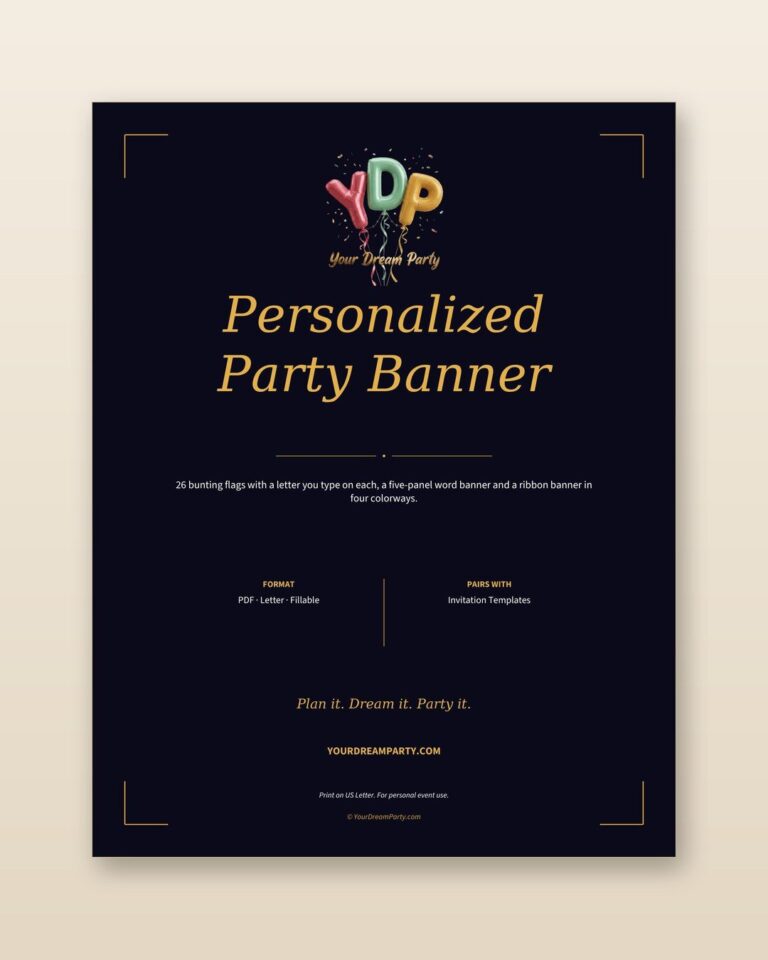
Personalized Party Banner
- 26 bunting flags: type one letter, number or symbol on each
- 5-panel word banner on landscape panels
- 4 ribbon banners in 4 colorways
- Flags come set to HAPPY BIRTHDAY; retype them with any words
What the Party Name & Hashtag Generator Builds for Your Feed
Your results page pulls the whole naming bundle together from what you entered. Each block points to one next step: the invitation copy, the social-share prompt, and the signage order.
Five party-name suggestions. A list of 5 names built from the guest of honor, the occasion, the vibe, and the milestone number if you gave one. A 30th birthday on the bold preset might offer "Sara Hits 30" (bold sets every name in capitals) alongside 4 siblings, and if none of them land, each Regenerate press brings in new names while keeping some of the earlier ones.
Letter board mockup. The top name rendered as a faux felt letter board, so you can see the words as an object before anyone prints them. It refreshes with the list, so regenerating the names swaps the preview to whatever comes out on top.
Ten hashtag suggestions. Ten options built off the same name and vibe, every one of them 30 characters or less and free of year references, so they stay easy to type and still make sense when the photos resurface. This list regenerates on its own button too, independently of the names.
A bundle you can hand on. Print, Copy All, and the email button carry the 5 names and the 10 hashtags to the planning binder, the invitation-copy writer, the stationer, and the banner printer as a single-glance reference; the top-name mockup stays on screen and is left out of the printout.
Run the Generator Across Common Naming Scenarios
Here are 3 common naming patterns. Each one runs the same 5 steps, but the result differs because your inputs point the generator in a different direction.
Pattern 1, birthday, guest of honor "Mia", milestone 7, punny vibe. The generator builds 5 names leaning on wordplay ("Mia's 7-derful Birthday", "Party Like It's Mia's Birthday"), renders the top one on the letter board, and returns 10 short hashtags off the same root (#MiaTurns7, #TeamMia). This setup fits kids birthdays where parents want a coherent photo recap from the friend-parent network. Pair with the kids birthday party ideas guide for the wider theme context.
Pattern 2, bachelorette or bridal shower, guest of honor "Sarah", no milestone number, cheeky vibe. For this one the generator builds 5 names with a sharper edge ("Main Character: Sarah", "Plot Twist: It's Sarah's Bachelorette"), previews the top pick as a letter board, and returns 10 hashtags off the same name, all inside the 30-character cap. Best for bachelorette weekends where guests post across the whole trip and the tag has to be typable one-handed.
Pattern 3, wedding, guest of honor "Marcus, Lara", no milestone number, elegant vibe. Here the comma tells the generator to treat both names together, and it builds 5 names anchored on the pair ("An Evening with Marcus & Lara", "A Marcus & Lara Wedding") plus 10 matching hashtags (#MarcusAndLaraWedding, #TeamMarcusLara) with no year in any of them. It suits traditional wedding naming, where the same words have to cover invitations, signage, and the photo-collage display years later.
For the broader styling context, the bachelorette party invitations guide covers the matching invitation copy the party name anchors, the bridal shower invitations guide walks through the shower invitation wording and the print-or-digital choice, and the baby announcement ideas guide covers the announcement wording and photo that come before the baby shower.
Pick the Right Answers Before You Build the Hashtag
A few inputs sharpen the recommendation. Run through these before you start so the generator has the right details to work with.
Choose the occasion honestly. The occasion supplies the event word that many names and hashtags are built on, so a birthday and a retirement on the same vibe preset come back with much of the same phrasing around a different event word ("Sara's Birthday Celebration" against "Sara's Retirement Celebration"). Picking "general celebration" because none of the 10 look exact swaps that word for a generic "Celebration", so take the nearest real match instead.
Pick the name in the form guests will recognize. "Mia" sounds warmer than "Maria Elena"; "Sarah, James" sounds warmer than "Mr. and Mrs. Wellington" on a friend-group hashtag. The generator weaves that name into every party name it builds and uses the first word of each name in the hashtags, so the wrong form produces a list the friend group does not link to the host. Use the version friends use when texting about the event.
Fill the milestone field only when the number matters. Leave it blank and the generator skips the milestone-name family altogether; fill it and a name like "30 Years of Sara" on the sentimental vibe joins the list. It is worth entering for a round birthday or a landmark anniversary, and worth leaving empty when the number is not the point of the party.
Try more than one vibe before settling. Classic and elegant produce restrained names; punny plays on words and cheeky leans on irreverent humor; sentimental and bold pull in opposite directions again. The results screen has no vibe switch, so running the same guest of honor through 2 presets means pressing Start Over and answering again. It is still the fastest way to find out which wording the friend group will actually use.
Search the hashtag yourself before anything gets printed. The generator builds the strings; it does not go and look at what is already posted under them. Take your favorite from the 10, search it on the channels your guests actually use, and check the existing posts are unrelated to your event. It takes about 90 seconds and it is the step that stops a printed banner pointing guests at a stranger's wedding.
Save the naming bundle before the invitations send. The names and hashtags are the cleanest reference for the invitation writer, the stationer, the banner printer, and the host who runs the welcome sign on the day of the party. Keep it with the planning binder; share it with the co-host placing the printable orders; keep a copy on the phone for the day-of host briefing the photographer.
Frequently Asked Questions
Is the Party Name & Hashtag Generator actually free?
Yes. The generator, the 5 party-name suggestions, the letter board mockup, and the 10 hashtag suggestions cost nothing and require no signup, and both lists regenerate as often as you like. The optional upgrade is the Personalized Party Banner ($12.00), which comes as a fillable PDF with 3 banner styles you type your chosen name onto and print.
How do I create a hashtag for a party?
The strongest party hashtags carry the guest of honor's name plus the occasion or the vibe, kept short enough to type from memory. The generator anchors to that name first, weaves the occasion and vibe through it, and returns 10 options, every one capped at 30 characters and free of year references. The full naming bundle takes under a minute.
What makes a strong party name?
The strongest party names are short, anchored to the guest of honor or the relationship, and tied to the milestone or vibe of the event. A 30th birthday works better as "Sarah's 30-derful Birthday" than as "Sarah's 30th Birthday Party"; a wedding works better as "Marcus & Lara, Always" than as "The Wedding of Marcus and Lara". The generator builds 5 per run so the host can pick the wording that sounds strongest to the friend group.
How long should a party hashtag be?
Short enough to type from memory and read at a glance in a busy feed. The generator caps every suggestion it returns at 30 characters, so you never have to check the length yourself, and it keeps year references out of them entirely so the tag still reads correctly when the photos resurface later.
Can the generator make wedding hashtags?
Yes. Pick "wedding" in Step 1, enter both names separated by a comma at Step 2, and the generator treats them as a pair, anchoring the names and hashtags to the couple. Set the vibe to elegant or punny depending on how formal you want it to sound. The output works for the save-the-date, the invitation, the welcome sign, the cocktail-table cards, and the photo-collage display.
What if my hashtag is already taken?
The generator returns 10 at a time precisely so a clash is not a dead end: search your favorite, and if the existing posts belong to someone else's event, take the next one down the list. Each Regenerate press on the hashtag list swaps part of it for new tags, and a run on another vibe preset changes the tags built on the vibe word. Do that search before you commit to a printed banner, not after.
Can I save or share the naming bundle?
Yes. Copy the names and hashtags out to the planning binder, the invitation writer, the stationer, the banner printer, and the day-of welcome-sign host, so everyone works from the same 5 names and the same 10 tags.
Ready to Name Your Party?
The Party Name & Hashtag Generator takes the question of what to call the party off the group chat, pairing a name list with a matching hashtag list in one pass. In under a minute, 5 steps give you 5 party-name suggestions, a letter board mockup of the top one, and 10 hashtags capped at 30 characters with no year in them. The Personalized Party Banner below gives that naming a place on the wall: 3 editable banner styles you type it into and print.
This page contains affiliate links to Amazon and other retailers. As an Amazon Associate, we earn from qualifying purchases at no extra cost to you. This helps us keep all our tools free.
Results generated by this tool are for planning and inspiration purposes only. Estimates are based on general guidelines and may vary depending on your specific circumstances. Always verify with your suppliers before making purchasing decisions.