How Does the Graduation Party Planner Work?
The planner moves through 5 short steps, starting with the graduation level, so the plan you end up with fits the graduate you are actually celebrating, not a generic high-school-graduation template. Give it a couple of minutes on a phone or laptop; there is no signup or email wall before your result.
Step 1, graduation level. Pick from 8 levels (kindergarten or preschool, elementary, middle school, high school, college or university, graduate, professional, trade school). The level sets the photo count on the photo display together with the theme angle (on the memory lane wall, 14 photos for a high-school grad and a 4-photo arc for a trade-school one), and it decides which extra decor pieces land on the checklist, what goes on the achievement display, and which favor ideas you are offered.
Step 2, school colors. Two color pickers, a primary and an accent, sitting above a Use these colors button and a skip link. Set both, then press the button or continue to Step 3, and the planner treats those hex values as the decor palette, overriding the Step 5 theme palette; skip, or leave the pickers untouched, and the theme angle supplies the palette instead. The helper text points you at the school's own site, often under Athletics or About, for the official hex codes.
Step 3, celebration style. Six formats: backyard cookout, catered at home, restaurant dinner, banquet hall, open house, or joint with classmates. This is what picks your day timeline template, so a cookout gets a grill-led sequence and a banquet hall gets a welcome hour with speeches paced between courses. Choose the joint option and an extra step opens for the number of graduates.
Step 4, guest count. Four size cards (small 5 to 15, medium 20 to 40, large 50 to 100, grand 100 to 200) or type an exact total between 5 and 200. The count sets the favor quantity, and at 60 guests or more the timeline picks up a sizing note about running the photo wall in 2 waves and starting the speech block 10 minutes late.
Step 5, theme angle. Five angles: future plans, memory lane, adventure ahead, Class of [year] traditional, and hobby or passion-themed. The angle picks the photo display with the level, adds its own decor piece (from a compass motif on the favor tags to a hobby corner on the gift table), and supplies the 3-color palette whenever school colors were skipped. Pick the Class of [year] angle and a year field appears that you must fill; the year then shows on the Class of banner, in the result badges, the summary line, and the calendar file title.
🛒 As an Amazon Associate, we earn from qualifying purchases, at no extra cost to you.
Graduation Balloons
Shop on AmazonClass Of Banner
Shop on AmazonLED Marquee Letter Sign
Check Price on AmazonWhy the Graduation Party Planner Beats a Generic Mood Board Approach
A graduation inspiration board that mixes preschool ideas with college ideas is where many parents start, but it hides real costs. Plan from a mixed-milestone pin pile and you'll often pick decorations sized for the wrong age, prepare a speech-and-toast block that strikes the wrong tone, and find out at the venue that the photo display misses the full arc of the graduate's school years. The planner settles the graduation level at Step 1 and spends it on the decor extras, the achievement display, the favor ideas, and the length of the photo wall, so the frames you buy and the decorations you order match the grad before either goes in the cart.
Parents can come back to it as siblings and friends graduate over the years. Five reasons stand out.
- Decor, display, and favors that follow the level. A kindergarten grad gets an artwork board and mini diploma scrolls; a high-school grad gets a class banner in school colors and a path-ahead sign; a college or graduate-level grad gets a diploma easel, honor cords on display, and keepsake notecards. Some of the 8 levels share a set (kindergarten and elementary get the same favors, for one), but nothing on the checklist belongs to a graduate of another age group.
- A photo display with the count already worked out. The planner names how many photos to hang and how to space them, and on the memory lane angle that is 14 for a high-school grad, one per grade from kindergarten to senior year plus a baby photo; 6 for a college grad, one per college year plus a senior portrait and a current shot; 4 for a kindergarten send-off. It also suggests how to hang them, scaled to the count, from 2 rows on a clip rope or a frame grid for 14 photos to matching frames along a sideboard or an easel with mounted mat board for 4.
- A palette that starts with the school colors. Set both pickers in Step 2 and the plan runs on that primary and accent pair, with the hex codes printed beside each swatch and the balloon arch and the photo-wall backdrop both called out in those colors. Skip the pickers and the theme angle supplies a curated trio instead: navy, gold, and cream for future plans; warm sand, sepia brown, and gold for memory lane.
- A gift display worked out before guests arrive. Grad parties collect cards and envelopes, so the plan sets a money tree or card box near the photo wall, a signing display (a yearbook-style guest book or a large matted portrait guests sign in the margins), a gift table kept apart from the cake, and pre-printed thank-you placeholders so you can record who gave what.
- A speech order with the running times attached. Three slots, in order: the host welcome at 2 minutes, a guest of honor or mentor at 3, and the graduate answering last at 3. The block comes before the cake in every timeline (the banquet hall spreads it between courses), and the plan prints for whoever is running the toasts. Two graduates sharing the party get a 4-slot rotation instead, one speech each and a joint response.
The planner pairs cleanly with the Party Budget Calculator for sizing the spend across food, decorations, and favors, the Guest List & RSVP Tracker for the headcount you bring to Step 4, and the Charcuterie & Tablescape Designer for laying out the dessert station and grazing table that sit alongside the photo display.
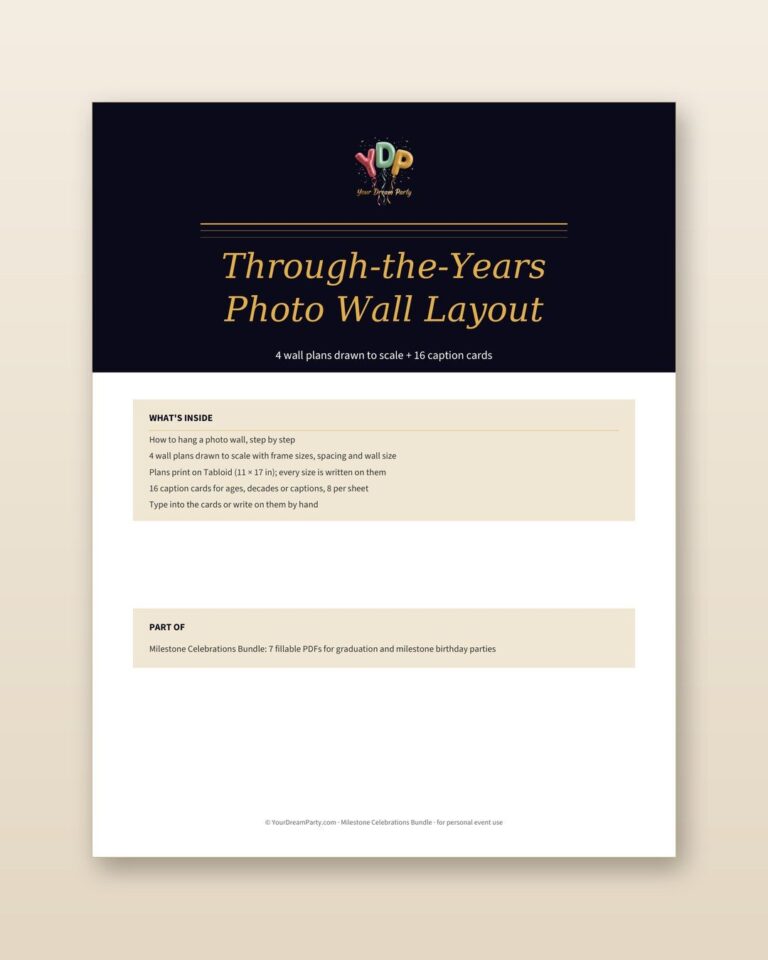
Milestone Celebrations Bundle
- Through-the-years wall: 4 wall plans and 16 caption cards
- 6 banner designs: graduation, milestone birthday and any celebration
- Speech running order and 8 speaker cue cards
- 8 gift and card box signs, plus 10 note slips
What the Graduation Party Planner Builds for Your Day
By the end, the results page holds your whole graduation-party plan. Every part points to a concrete next step, and all but the gift display come straight from your answers.
Result header and summary line. The top of the result carries badge chips for your level, celebration style, guest count, and theme angle, plus a Class of chip and a school-colors chip when those apply, then one summary line that reads the level, style, headcount, and theme back in order. Copy that line into the group text when co-hosts ask what the plan is.
Palette strip. A row of swatches, each a colored dot with its name and hex code, tagged with where it came from: your school colors or the theme angle palette. Two swatches when the school colors are set, 3 otherwise. The decor lines quote the same colors back, so the balloon order and the backdrop use one reference.
Photo display. Named for your theme angle, the block prints the photo count and the span it covers, then how it spaces them; on the memory lane wall that is one per grade from kindergarten to senior year plus a baby photo for high school, one per college year plus a senior portrait and a current shot for college, a tight 4-photo arc from undergrad cap to grad cap for a master's or PhD, 4 photos from baby to the send-off for kindergarten. Display method and the backdrop palette come with it.
Decor checklist. Three lines every plan carries (a balloon arch or column pair in your palette, a tassel garland along the food table or backdrop, and centerpieces of caps and tassels in clear vases with flowers and votives), then 1 or 2 more from your level, plus one from your theme angle, such as a diploma easel for a college grad or a globe or atlas centerpiece with an adventure-ahead sign over the cake.
Speech order. Three numbered slots with a minute count and a talking-point line on each: the host welcome (thank guests, set the tone), a guest of honor or mentor (the teacher, coach, or family friend who shaped the journey), and the graduate last (thank guests, acknowledge supporters, look ahead). A closing note argues for 3 short speakers over 6 long ones. Joint celebrations swap in a rotation with one speech per graduate.
Hour-by-hour day timeline. Six to eight slots running from setup at T-60 or T-90 through the wind-down, written for the celebration style you picked; most run arrivals with the graduate in cap and gown, food service, the speech block, cake and the tassel toss, then favors by the door. Enter a party date and the sequence exports as an .ics file, with an all-day entry for the party and one more per slot, the offset written into its title.
Favor list with a count. Favor ideas follow the level: mini diploma scrolls, class-of candy bags, and a pencil and bookmark pack for the youngest; mini diplomas, school-color candy bags, and a cap-and-gown photo magnet through middle and high school; a keepsake notecard, a branded coaster or matchbook, and a mini champagne bottle for college and up. One quantity line closes the list, your headcount times a 1.1 buffer, rounded up.
Take the plan with you. The action bar under the result copies the decor plan on its own, copies everything, prints the plan, emails it to you, downloads the day timeline as an .ics file, shares a short line and the planner link, or opens a Pinterest pin for the planner. Copy All carries the header, the palette, the decor checklist, the photo display, the achievement display, the timeline, the speech order, the gift display, and the favors.
The printable bundle upgrade. The Milestone Celebrations Bundle sits below the plan at $17.00, with 4 through-the-years photo wall layouts, 6 editable milestone banner templates, 8 speech order cue cards, gift and card box signage, 30 memory-game prompt cards, and fillable mini certificate designs, for when you want the full printable kit.
Use the Planner Across Common Graduation Setups
Graduation parties tend to fall into a few patterns. The 5 steps stay the same; what changes is where your answers take them.
Pattern 1, high-school graduation, backyard cookout, 60 guests, school colors navy and gold, memory lane angle. You get a navy and gold palette with both hex codes printed, a decor checklist carrying a class banner in those colors and a path-ahead sign, a 14-photo wall running one frame per grade from kindergarten to senior year plus a baby photo, a cookout timeline from the T-90 setup to favors at the door, the 3-slot speech order, and 66 favors (60 guests times the 1.1 buffer). It fits a backyard party for a high-school grad.
Pattern 2, college graduation, restaurant dinner, 80 guests, school colors skipped, future plans angle. You get the navy, gold, and cream theme palette, a diploma easel and a compass motif on the favor tags, a 3-photo milestone wall from the high-school senior portrait to commencement day, ending at a what's next board, a seated-dinner timeline that puts the speeches at T+110 after the main course, and 88 favors built on keepsake notecards and branded coasters. It suits a restaurant dinner for a college grad.
Pattern 3, kindergarten graduation, catered at home, 25 guests, school colors skipped, hobby or passion angle. You get the plum, gold, and champagne theme palette, an artwork board of the year's hand-prints plus a hobby corner on the gift table, a 4-photo hobby wall running from the first try to today, a seated timeline with the speech block at T+110, and 28 favors drawn from mini diploma scrolls, candy bags, and pencil and bookmark packs. It works for a catered party at home for a kindergarten grad.
To dig into a specific milestone, the high school graduation party guide goes deep on senior-year staging, the college graduation party themes guide covers post-secondary celebrations, the graduation party decorations guide handles the visual side, the graduation party themes guide runs through theme directions across milestones, the graduation party checklist guide lays out the planning timeline, and the preschool graduation ideas guide focuses on the youngest grads.
Pick the Right Answers Before You Plan
A few careful choices make the whole plan fit better. Take a moment on these before you run the planner.
Pick the graduation level honestly, not aspirationally. A middle-school promotion is not the same celebration as a high-school graduation, even when the family wants to mark it in a big way. Choose high school for an 8th-grade promotion and the memory lane wall asks for 14 frames instead of 10, and the checklist hands you a college-bound sign for a 13-year-old. Pick the real level and the decor, the display, and the favors land with it.
Choose the theme angle for the graduate, not the inspiration board. The angle in Step 5 does 3 jobs: it picks the photo display with the level (a map-pin display for adventure ahead, a hobby-in-photos wall for hobby), it adds a decor piece (memory lane signage at the wall entrance, a globe or atlas centerpiece for adventure ahead, a hobby corner built from the graduate's own things), and it supplies the palette whenever you skip the school colors. Pick the one the graduate would recognize as theirs.
Type the real headcount rather than tapping a band. The size cards store 12, 30, 75, or 150 behind the labels, and that stored number is what the favor count multiplies. Typing 45 gets you 50 favors; tapping Medium gets you 33. The 60-guest mark also matters: reach it and the timeline adds the 2-wave photo wall note and the staggered speech start.
Pick the celebration style the day will actually run as. Backyard cookout gets a grill-led sequence with the speeches at T+90; banquet hall gets a welcome hour, a seated dinner, and the speeches split into 2 blocks between courses; open house gets a drop-in shape whose speech moment is marked optional. The style you pick is the whole shape of the timeline, so choose the one that matches the room.
Enter the school colors accurately, or skip the field. They feed the palette card once you press Use these colors or move on. Skip them when school colors matter and the palette misses the graduation tie-in; enter the wrong ones and the palette fights the school's identity. Check the official colors on the school's website or in the yearbook before you pick them.
Say up front if 2 or more graduates are sharing the day. Choosing joint with classmates in Step 3 swaps in the joint speech rotation and opens an extra step for the number of graduates, anywhere from 2 to 6, and that number splits the plan: one photo zone and one gift table per graduate, with a shared favor table. Run it as a single-graduate plan and none of that appears.



Shop the Graduation Collection
A Graduate hoodie, a Next Chapter tumbler and a Degree Earned mug, with no year or school name printed.
Frequently Asked Questions
Is the Graduation Party Planner actually free?
Yes. The planner, the result page, the palette, the decor checklist, the photo wall, the achievement display, the day timeline, the speech order, the gift display, and the favor list are all free, with no signup. The main paid extra is the Milestone Celebrations Bundle ($17.00), which builds on the planner's output with photo wall layouts, editable banner templates, speech order cue cards, gift and card box signage, and fillable mini certificate designs. The related printables listed under it on the result cost extra as well.
Can I use this for a postgraduate or non-traditional graduation?
Yes. Step 1 splits the upper levels into graduate (master's or PhD), professional (med, law, MBA), and trade school, so a credential or technical qualification has its own option instead of being folded into college. Each one carries its own 4-photo arc on the memory lane angle, and trade school gets its own achievement display as well. The school colors in Step 2 are optional too, so grads without them can skip and take the Step 5 theme palette.
How does the planner handle a graduate who does not want a big party?
There is no shy-or-outgoing setting, but the plan bends quiet without one. Pick open house in Step 3 and the timeline's speech moment arrives marked optional, about 8 minutes in all, skippable if the room stays informal; take the small guest band or type a number in the teens in Step 4 and the favor count follows. The speech order still runs 3 short slots with the graduate last, which is about as light as a toast block gets.
Does the planner suggest specific food and recipes?
No. The planner has no food or menu section; the meal shows up only as timeline slots, such as food service at a cookout, a seated first course, or a grazing-table restock at an open house, and the plan stays with styling and coordination. No recipes, calorie counts, allergen advice, or dietary guidance appear. For graduation menu styling, the graduation party food guide covers the buffet formats, the dessert table, and the cost per guest.
Can the planner handle 2 graduates at the same party (siblings, twins, friend pair)?
Yes, and you do not have to run it twice. Pick joint with classmates in Step 3 and Step 6 asks how many graduates, 2 through 6. The plan then splits the decor into one photo zone per graduate linked by a shared tassel garland, gives each a labeled gift table, keeps one favor table for everyone, and swaps the speech order for a rotation: host welcome, a speech per graduate, then a joint response in alphabetical order. It also raises the cost split between families, per guest for food and venue, evenly for decor and favors.
How does the planner handle the photo display when the graduate switched schools?
The photo wall block gives you a count and a spacing rule, not a fixed grid, so a graduate who switched schools partway can group the frames by school and still hit the count. Hang them on a clip rope, in matching frames along a sideboard, or on an easel with mounted mat board, whichever suits the room. On the memory lane angle, a master's or PhD grad gets a separate 4-photo arc anyway: undergrad graduation, mid-program, the thesis defense or capstone, and today.
Can I save the plan and revise it as the date approaches?
Yes. The plan saves to your own browser as you answer, so reopening the planner on the same device brings back the finished result without re-answering anything. It keeps that copy until you press Start Over, which is also the way in to change an answer: the reset clears the saved plan and drops you back at the hero to run the 5 steps again, about 2 minutes. Print Plan opens the browser print dialog if you want it on paper or saved as a PDF from there.
Ready to Plan Your Graduation Party?
Tie the plan to the actual milestone instead of a scattershot mood-board scroll, and the Graduation Party Planner fills in the rest. Two minutes, 5 steps, and you have a decor checklist keyed to the level and angle, a palette from the school colors or the theme, a photo display with the frame count settled, an achievement display, an hour-by-hour timeline, a 3-slot speech order, a gift display, and a favor list counted against your headcount. The Milestone Celebrations Bundle below takes it further with photo wall layouts, banner templates, speech order cue cards, and fillable mini certificate designs, for parents who want the full printable kit.
This page contains affiliate links to Amazon and other retailers. As an Amazon Associate, we earn from qualifying purchases at no extra cost to you. This helps us keep all our tools free.
Results generated by this tool are for planning and inspiration purposes only. Estimates are based on general guidelines and may vary depending on your specific circumstances. Always verify with your suppliers before making purchasing decisions.