How Does the Baby Shower & Gender Reveal Planner Work?
The planner takes you through 7 short steps, with an eighth opening only for a gender reveal, so what you get fits the shower you are actually hosting, not a generic 25-guest template. The whole flow takes under 3 minutes on a phone or laptop, and there is no signup or email wall before your result.
Step 1, event type. Two cards here: baby shower, or gender reveal party. The pick controls whether a reveal step opens at the end of the flow, and it names your result page, [Name]'s Baby Shower Plan or [Name]'s Gender Reveal Plan, once you give a first name in Step 2.
Step 2, the mother-to-be. A first name and an event date, both optional. Leave them blank and the countdown counts in relative weeks; put the date in and every week block carries the calendar week it falls on, from 12 weeks out down to party week, or from today when the party is under 12 weeks away.
Step 3, theme style. Eight themes are on offer (woodland, floral, safari, celestial, boho, pastel, neutral, sprinkle). All 8 stay on the table for both event types, and whichever you take sets the palette, the decor anchors, the 3 games, and the search terms behind the Amazon strip.
Step 4, guest count. Four size bands (Intimate 8-12, Classic 13-22, Big 23-40, Grand 41-60) sit alongside manual entry for any number between 8 and 100. The figure you settle on heads the plan and rides along in the copied and emailed versions.
Step 5, venue. Pick at home, rented space, garden, restaurant, or park. The venue heads your plan and your export, and on the reveal track an indoor pick collides with an outdoor-only mechanism: pick a restaurant and the smoke bomb comes back flagged, with the confetti cannon and balloon pop named as the swaps.
Step 6, time of day. Brunch, lunch, afternoon tea, or evening, each card carrying its own window (afternoon tea runs 2 to 5 p.m.). Step 7, budget tier. Four bands (Under $200, $200-$500, $500-$1K, $1K+), which set a decor tier and a per-favor price band, badge the plan, and travel with the emailed copy.
No reveal toggle. Whether an eighth step appears was settled back in Step 1: pick gender reveal party and Step 8 opens after the budget; pick baby shower and the flow runs straight to the review screen.
Step 8, reveal mechanism (conditional). Five options (cake cutting, balloon pop, smoke bomb, confetti cannon, other). Your choice writes the reveal moment plan on the result page, 5 setup steps for that mechanism, and the smoke bomb brings its own safety reminder.
🛒 As an Amazon Associate, we earn from qualifying purchases, at no extra cost to you.
Baby Shower Decorations
Shop on AmazonPastel Balloon Garland Kit
Check Price on AmazonBaby Shower Guest Book
Shop on AmazonWhy the Baby Shower & Gender Reveal Planner Beats a Blank Checklist
A generic checklist pulled from a web search is the cheapest planning shortcut going, but it hides real costs. Start from a flat list and you'll often miss the theme-palette match, undercount the favors for the guest size, and forget to line the gender reveal up with the timeline. The planner closes those gaps by settling 7 answers up front, so the palette, the decor anchors, and the games all fall out of a single theme pick, and the reveal, when there is one, gets a plan of its own instead of a mention.
Five reasons it earns its place, one shower to the next.
- A countdown of up to 12 weeks, tied to your date. The checklist gives each task its own week before the event (set the venue 12 weeks out, order the cake 9 weeks out, lock the games list 8 weeks out). A flat list piles everything into one column and leaves you to order it; the planner puts it in order for you.
- Theme, palette, and decor that match, built in. Pick boho in Step 3 and it carries into a terracotta-and-sage palette, pampas and bunny-tail bundles in terracotta vases, and a macrame backdrop behind the mother-to-be's chair, all at once. A flat checklist makes you choose each of those separately and hope they come together as one room.
- Decor anchors marked as the first buys. Every theme lands 4 specific pieces instead of a wall of inspiration: boho gets the pampas vases and the macrame backdrop, pastel gets the balloon garland over the gift table and a macaron tower on the dessert table. Buy those first and let the rest be texture and filler; a flat list only says decorations.
- A gender reveal section that appears only if you need it. Planning a shower alone means a streamlined 7-step flow with no reveal section. Planning a gender reveal opens Step 8 and adds a reveal moment plan of its own, 5 setup steps for the mechanism you picked, a safety reminder on the smoke bomb, and a venue check when a smoke bomb or a custom reveal meets an indoor venue. Flat lists leave you to bolt the reveal on as a separate event.
- Game ideas matched to your theme. Three game suggestions show up on your result page, chosen to fit the theme you picked. A woodland shower gets Forest Friends Bingo and an Acorn Wishes Jar; a celestial one gets a Star Wish Jar and a constellation drawing race. A generic list hands you the same baby bingo variants no matter the room.
The planner teams up with the Party Budget Calculator for sizing the spend across categories, the Party Planning Timeline for as many as 8 milestones between 8 weeks out and day of, and the Party Color Palette Generator for a 5-color palette and its 60/30/10 split before you place the decoration order.
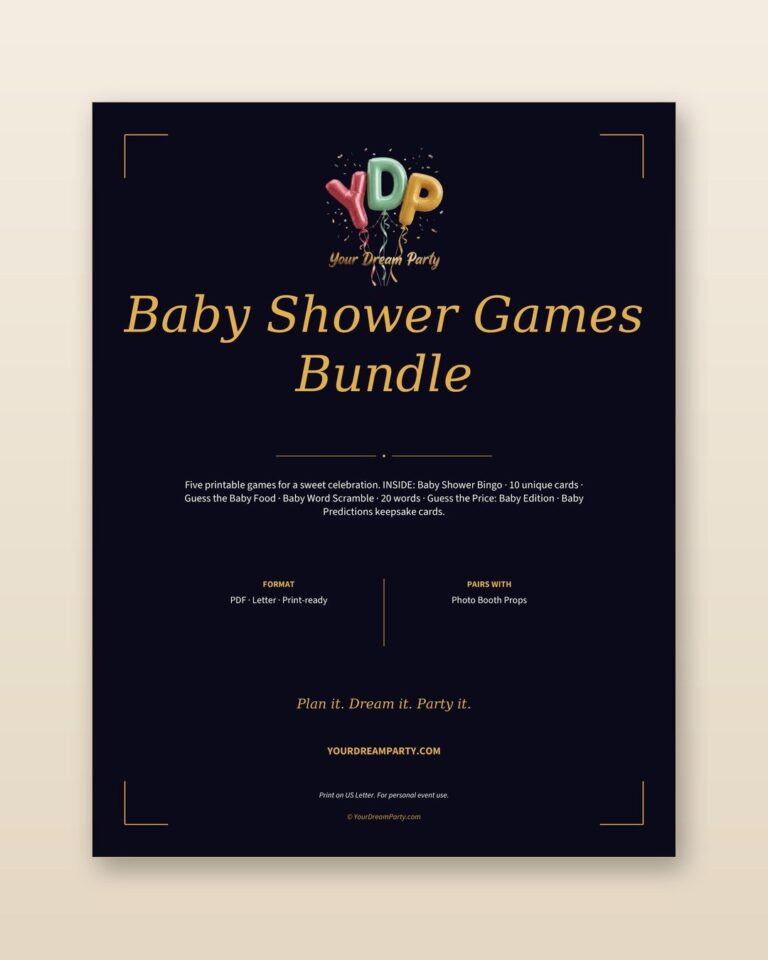
Baby Shower Games Bundle
- Baby Shower Bingo: 10 unique 5×5 cards and a caller sheet
- Guess the Baby Food: tasting cards for 10 jars and a host answer sheet
- Baby Word Scramble: 20 words with an answer key
- Guess the Price: Baby Edition, with a host sheet for your own receipts
What the Baby Shower & Gender Reveal Planner Builds for Your Event
Reach the end and you have one complete plan, shaped by the 7 answers you gave, 8 when a reveal is in play. Print it and it works straight through, from the shopping run to day-of setup.
12-week countdown checklist. Twelve week blocks, 46 tasks in all (47 for a gender reveal), each block headed by its week number and either a calendar week or a countdown label; a date under 12 weeks away gets one block per week left, and the tasks of any weeks already gone move to a catch-up list at the top. Lock the date, send the save-the-dates, order the invitations, book the caterer and the cake, order decorations, chase the RSVPs, walk the helpers through it, assemble favors, then run the day itself. Give an event date in Step 2 and every block lands on a real week of your calendar.
Theme color palette card. Four swatches with hex codes, drawn from your Step 3 theme (boho brings terracotta, sage green, cream linen, and wood tone; pastel brings blush pink, soft mint, butter yellow, and sky blue). The card prints as a reference for the florist, the cake artist, and the decoration shop.
Decor anchors for the theme you picked. Four pieces written as instructions, not pinned images; for boho, that includes a macrame wall hanging behind the mother-to-be's chair and pampas and bunny tails in terracotta vases down the center of the table. Buy the anchors first; the rest of the room is texture and filler.
Three game suggestions matched to your theme. Each comes with the materials to gather and how to play it, and the section holds the whole games block to 30 minutes. The set changes with your theme (safari fields Safari Animal Charades, a Bottle Hunt Expedition, and Wild Animal Sound Match; neutral fields a time capsule, a name story circle, and a bodysuit design studio).
Gender reveal moment plan (conditional). On the reveal track this section lays out 5 setup steps for your mechanism, from ordering the prop to briefing the operator and cueing the photographer, plus a safety reminder on the smoke bomb and the custom option, and a venue check if either one is planned for an indoor venue. The reveal becomes one part of the larger day, not a separate event.
A venue check where it matters. Your venue heads the plan and travels with the export, and on the reveal track an indoor pick (at home, a rented space, a restaurant) sends the smoke bomb back with a warning to move it outside or swap in the confetti cannon or the balloon pop.
The printable games upgrade. The Baby Shower Games Bundle sits below the plan, the same 5 printables every time (bingo, guess the baby food, word scramble, guess the price, prediction cards), for when you want the pack ready-made instead of cutting the bingo cards and word scrambles yourself.
Use the Planner for a Shower or for a Reveal
Whatever kind of shower you are throwing, the 3 shapes below show how the answers play out. The 7 steps stay the same, and a reveal adds its mechanism step; your answers do the rest.
Pattern 1, pastel baby shower, 25 guests, at home, afternoon tea. You get the 12-week countdown, a pastel palette (blush pink, soft mint, butter yellow, sky blue), pastel decor anchors that put a balloon garland over the gift table and cloud balloons above the desserts, and 3 pastel games: bodysuit decorating, cupcake decorating, and a blindfolded baby-food tasting. No reveal section. Suits first-time grandparents who are hosting.
Pattern 2, gender reveal party, 18 guests, garden venue, smoke bomb. The countdown still runs its 12 weeks, the theme still drives palette and games, and Step 8 adds the smoke bomb plan: order from a verified retailer, hand it to one adult helper, move the gathering outdoors and well clear of any structure, fire on the photographer's cue, then let it cool fully before it goes in the trash. The garden keeps the venue check quiet, since the mechanism is outdoor-only anyway. Made for tight-knit immediate-family reveals.
Pattern 3, neutral gender reveal party, 40 guests, rented hall, cake cutting. You get the same 12-week countdown, a neutral theme of cream, sand, eucalyptus, and wood tone that photographs well under hall lighting, its 4 decor anchors, 3 neutral games, and a cake cutting plan that has you put the interior color on the bakery's order ticket in writing and hold the first slice for the camera. Fits first-baby celebrations where extended family wants to attend.
To explore themes before you run the planner, the Baby Shower Themes for Boys and Baby Shower Themes for Girls guides walk through the gender-specific palettes, and the Gender Reveal Party Ideas hub goes deep on the moment-plan options.
Pick the Right Answers Before You Plan
A few answers make the whole plan tighter. Give these a moment before you begin.
Give the event date if you have one. It is optional, and leaving it out only costs you the calendar labels; the countdown runs its full 12 weeks unless the date is under 12 weeks away, when it shortens to the weeks left. The field takes any date from today to 2 years ahead, so a soft date can go in now and be corrected later.
Pick the theme honestly for your venue. A woodland theme looks wonderful in a garden or a sunlit living room but falls flat in a fluorescent-lit rented hall. If your venue lighting is fixed and unflattering, go with neutral or pastel, which both handle harsh light better than detail-heavy themes.
Type the exact guest count if you know it. The 4 preset bands (8-12, 13-22, 23-40, 41-60) drop in a fixed number, but the manual field takes anything from 8 to 100 and that exact figure is what heads the plan. Round up while your RSVP list is still coming in; a small overestimate on favors is easier to handle than a shortfall at the venue.
Pick the budget tier for the day you want, not the wallet you fear. The cards run Budget-friendly under $200 for smart picks, Mid-range at $200-$500 for a well-decorated room, Elevated at $500-$1K for layered and premium, and Luxury at $1K+ for a full installation. The tier sets how much of the decor you make yourself and a favor price band, badges the plan, and rides into the emailed copy, so whoever is helping knows what was agreed.
Pick the event type on purpose. If the parents-to-be have already shared the gender publicly, take baby shower in Step 1 even if you first planned a reveal moment. Step 8 never opens, the reveal section stays off the result page, and the day tends to run smoother once the surprise is gone.
Send the plan itself, not the link. The result page prints, and Copy All puts the countdown, games, reveal, and decor into plain text; the emailed copy carries the same plan, your answers included, to your own inbox. The Share button sends, at most, the event type, theme, and guest count with the tool address, so print the countdown checklist for the fridge and paste the copied plan to whoever is helping with the games and the cake order.
Frequently Asked Questions
Is the Baby Shower & Gender Reveal Planner actually free?
Yes. The planner, the result page, the printable countdown, and the decor sheet all cost nothing and need no signup. The featured optional add-on is the Baby Shower Games Bundle ($12.00), which gives you print-ready bingo, word scramble, prediction cards, and a guess-the-price game so you skip the DIY part entirely.
Can I run the planner on my phone?
Yes. It is built phone-first and reflows cleanly on tablet and desktop. A phone in hand works from any room, which helps when the parents-to-be are nearby and you want to keep the planning private.
Does the Baby Shower & Gender Reveal Planner cover gender-neutral showers?
Yes. Step 1 offers one baby shower card and never asks the gender. Take the neutral theme and the palette comes back cream, sand, eucalyptus, and wood tone, with a eucalyptus garland and a Welcome Little One sign; woodland, safari, and boho read the same way, and neutral's 3 games (a time capsule, a name story circle, a bodysuit design studio) stay clear of pink-or-blue framing.
What if I want to switch themes after running the planner?
Re-run the planner with the new theme selected. You can re-run it as often as you like, and each pass takes under 3 minutes; Start Over clears every answer, so enter the same event date again and the countdown keeps its dates, while the palette, decor list, games, and Amazon picks all follow the new theme.
How does the planner handle a shower that ends in a reveal?
Pick gender reveal party in Step 1 and everything the shower track gives you stays (the countdown, the palette, the decor anchors, the 3 games), with a reveal moment plan added below the games. The countdown carries the reveal too: week 9 has you confirm the plan and hand one helper the cue, and party week slots the moment between the cake and the closing group photo.
Can I save the countdown for later?
Print it, copy it out as plain text, or email yourself the whole plan, countdown, games, decor sheet, and reveal guide included. Your answers also stay saved on the device you used, so closing the tab does not cost you the plan; the Share button, though, passes on the tool address with at most a one-line note of the event type, theme, and guest count, never the plan itself, so a co-host who opens it starts from a blank Step 1.
Does the planner cover safety for the smoke bomb reveal?
The reveal method section carries a safety reminder on the smoke bomb: outdoors only, one adult operating it, legality checked for your area before you buy, children and anything flammable kept clear, and the device cooled fully before handling or disposal. The custom option repeats it for any reveal using fire, chemicals, or projectiles. For full operating guidance, follow the manufacturer's instructions; the planner does not replace them.
Ready to Plan Your Baby Shower or Gender Reveal?
Scroll up and work through the 7 steps, 8 if a reveal is in play; under 3 minutes later you have a shower plan you can trust: a countdown of up to 12 weeks, a 4-color theme palette, 4 decor anchors, 3 games from that same theme, and a gender reveal moment plan when the event calls for it. Below, the Baby Shower Games Bundle offers a separate print-ready set of shower games, for anyone ready to skip the do-it-yourself round.
This page contains affiliate links to Amazon and other retailers. As an Amazon Associate, we earn from qualifying purchases at no extra cost to you. This helps us keep all our tools free.
Results generated by this tool are for planning and inspiration purposes only. Estimates are based on general guidelines and may vary depending on your specific circumstances. Always verify with your suppliers before making purchasing decisions.