How Does the Invitation & Sign Wording Generator Work?
The generator asks you 6 quick questions, one screen at a time, then shows a review screen before you generate. Each answer except the card style shapes the wording, so the 4 drafts fit the celebration you are actually hosting, not a generic invitation default. On a phone or laptop the whole thing takes under 2 minutes, with no signup or email needed first.
Steps 1 and 2, output type and occasion. Pick what you are creating (Invitations, Welcome Sign, RSVP Card, Save-the-Date), followed by one of 9 occasions (birthday, wedding, baby shower, bridal shower, bachelorette, graduation, anniversary, holiday party, general celebration). The occasion names the celebration in the body ("to celebrate the wedding of" and a name), while the tone decides whether it comes out formal or warm and chatty.
Step 3, tone. Pick from 6 tones (formal and traditional, warm and friendly, playful and fun, elegant and minimalist, bold and modern, heartfelt and sentimental). Tone sets the pool the 4 versions draw their opening lines from, so choosing warm and friendly gives you 4 different warm openings rather than 1 warm draft and 3 that miss the mark. Some picks hide a tone, so a wedding never offers bold and modern.
Step 4, key details. Enter the host name, the guest of honor (required for a birthday, baby shower, graduation or anniversary), the date, the time as you would say it, the venue (optional for a save-the-date), an optional address, and an optional custom message of up to 200 characters that the generator adds as the last line of all 4 versions. Press Continue with a required field blank and a short message names what is missing. You pick a full date, but the wording shows month and day only, which keeps it reusable, since adding the year ties it to one calendar.
Step 5, optional extras. Switch on the extras you want in the wording (dress code, RSVP info, registry or no gifts, health note, parking info, accessibility). Each adds a ready-made sentence in your tone, with no box for your own details, and only the invitation wording carries extras; the other output types leave them off. The generator works in only the ones you pick and leaves the rest out, so the final wording stays short and easy to skim instead of bloated with every possible note.
Steps 6 and 7, card style and review. Pick a preview style (Classic, Modern, Whimsical or Romantic); it changes the look of the preview card, never the words. The last screen lists your picks and key details so you can check them before you press Generate My Wording.
🛒 As an Amazon Associate, we earn from qualifying purchases, at no extra cost to you.
Printable Invitation Paper
Shop on AmazonInvitation Envelopes
Shop on AmazonWax Seal Stamp Kit
Check Price on AmazonWhy the Invitation & Sign Wording Generator Beats a Template Copy-and-Paste
A folder of saved templates is where many people start when they write the wording themselves, but it hides real costs. Copy from a template and you'll often lift a phrase built for a different event, miss the dress-code or RSVP cue the original assumed, and only spot the mismatch when the first guest texts a confused question. The generator starts from your event type, tone, and details, so every version already fits your card instead of carrying over a borrowed template's assumptions.
Here are 5 reasons to reach for it at every event you host.
- Four versions, not one rabbit hole. A single template piles on pressure when the wording feels off and you cannot say why. Four drafts, labeled Variant A to D, let you hold them up side by side against your venue, your guest list, and the mood you want, then choose the one that fits best. On an invitation they share your details and sign-off but open with different lines, and B and D word some extras differently, so the comparison means something.
- Matching welcome-sign copy in the same tone. Switch the results to the Welcome Sign tab and the generator writes sign versions for the door, the easel, or the entry table in the same tone as your invitation. Pick a playful invitation and you get a playful sign; pick formal traditional and the sign copy matches. It closes a gap many templates leave wide open.
- Evergreen date handling. The wording shows month and day only, never the year, because invitations get reused across years for similar events (anniversaries, birthdays, repeat hosting), and a year stamped on the wording dates the printable. Reprint the same invitation for the repeat celebration and you only swap the inner detail, not the wording itself.
- Real personalization, not placeholder text. Every invitation version works your names, date, time, and venue into the body instead of leaving square-bracket gaps to fill in. Templates that ship with [NAME], [DATE], [VENUE] placeholders hand the writing back to you; the generator does that work once and gives you finished copy that reads like it was written, not stitched together.
- Visual preview on the same screen. Each version has a Preview button that sets the wording on a styled card in the look you picked, so you can check the line breaks, the balance of title to body, and the spacing before anything prints. Plain-text templates leave that call to the designer or to your imagination, which is easy to get wrong.
It works well alongside the Guest List & RSVP Tracker for following responses once the invitation goes out, the Party Name & Hashtag Generator for the social tag that sits with it, and the Party Theme & Vibe Finder Quiz if you want to settle the theme before you draft the wording.
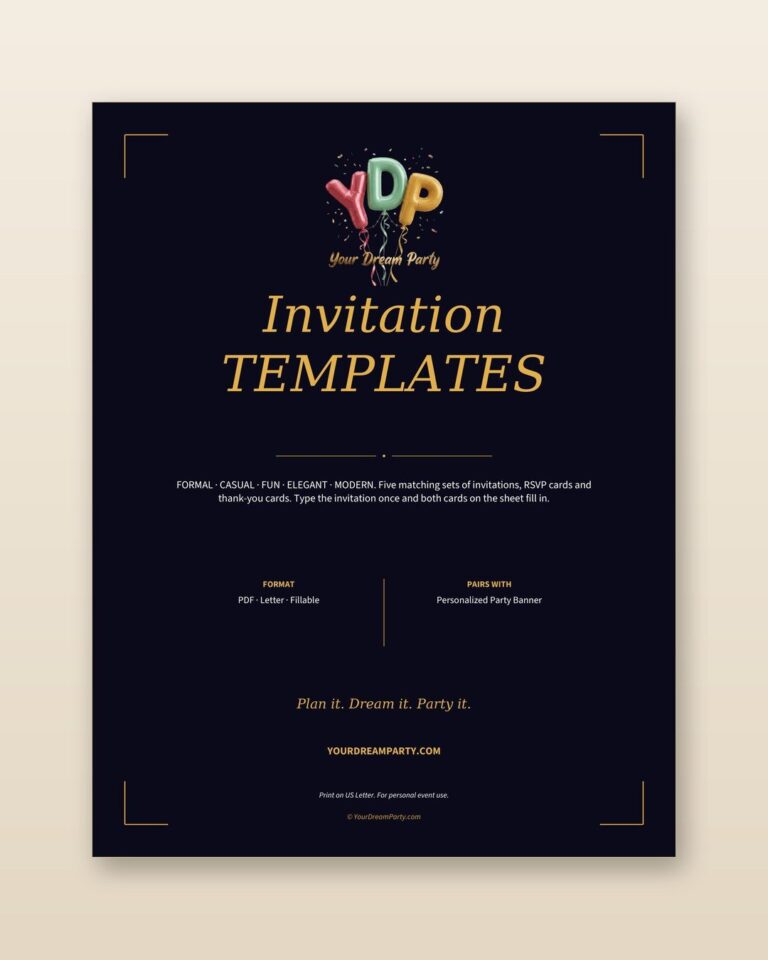
Invitation Templates
- 5 matching sets: Formal, Casual, Fun, Elegant and Modern
- Invitations, RSVP cards and thank-you cards in every set
- Type once: both invitations on a sheet fill in
- Text resizes itself to fit the card
What the Invitation & Sign Wording Generator Builds for Your Event
When you finish, the results screen lays out a full set of wording built from your answers. Every part is finished copy, drawn from your 6 answers, ready to paste into a design template, a digital invitation app, or a print order at the local copy shop.
Four invitation versions, one card each. The cards stack one under another, each with its label (Variant A to D), the full invitation copy you can grab with one tap of Copy, and a Preview button. Compare the 4 cards side by side before your invitation list goes out.
Matching welcome-sign copy. Welcome Sign is one of the 4 wording types, and a tab pill above the results switches to it without starting over, returning 4 sign-friendly variants of the same celebration. Each one is a short welcome headline over a line naming the celebration, in the tone you chose, so a bold and modern invitation gives you an all-caps bold sign to match, except at a baby shower, where the sign switches to the formal tone. Use it for the door easel, the entry-table sign, or the dessert-table heading.
Visual preview per version. Tap Preview on any card to see the wording on a styled card in the look you picked, under a fixed title such as "You're Invited." You can weigh the balance before you commit, so the version with the cleanest line breaks can win on looks as well as tone. The preview is a planning aid, not a final design; the printable Payhip product holds the production-ready layouts.
Copy, email, and print actions. Each card has its own Copy button, and the action bar adds Copy First Variant, Copy All, Print, Email My Wording, Share and Pin. Print gives a plain-text sheet of the open tab's versions, and the email carries each version in full. On a phone, you can drop the wording into a message thread for a partner to weigh in; on a laptop, Copy All gives you every version to paste into an email to the designer or the printer.
Canva link and related tools. Below the 4 cards, a Customize in Canva button opens Canva's invitation editor in a new tab, where you paste the wording you copied; nothing carries over on its own. Further down, a Related tools strip points you to the matching tool for RSVP tracking, next to the Party Name & Hashtag and Theme & Vibe Quiz cards.
The printable templates upgrade. The Invitation Templates (PDF) card sits below the Canva link, with matching stationery sets (Formal, Casual, Fun, Elegant, Modern) of invitations, RSVP cards, and thank-you cards you type straight into, for when you want the design done once the wording is set.
Use the Generator Across Common Invitation Scenarios
Three common setups follow. Each runs the same 6 questions but gives a different result, because your answers combine in different ways.
Pattern 1, birthday, warm and friendly tone, host name plus guest of honor, dinner at 7pm at home, dress-code extra toggled, custom message about a decade milestone. You get 4 versions that open with different warm lines, such as "We would love for you to join us as we celebrate [name].", each followed by "Please join us to celebrate [name]'s birthday.", the date and time, the dress-code line, and your milestone message last. Switch to the Welcome Sign tab for "Glad you could join us" over "[name]'s birthday celebration," ready to copy for the entry-table easel. A fit for milestone birthdays at home.
Pattern 2, baby shower, elegant and minimalist tone, host plus parent-to-be name, brunch at 11am at a private restaurant area, RSVP info and accessibility extras toggled, no custom message. You get 4 versions that open with spare lines such as "A quiet celebration of [name]. We hope you can join us.", with the date and time spelled out in words and the accessibility line in each one. In A and C the RSVP line reads "Kindly let us know if you can attend.", and in B and D it asks for a timely reply. The Welcome Sign tab gives you "In celebration of [name]" under headlines such as "We are delighted you are here." A natural fit for elegant baby showers in restaurant venues.
Pattern 3, anniversary, heartfelt and sentimental tone, host couple names (entered again as the guest of honor), evening cocktail at 6pm at a garden venue, dress-code extra toggled, custom message referencing a wedding-day inside joke. You get 4 versions that open with lines such as "This celebration would not feel complete without your presence.", the dress-code line "Wear what makes you feel like yourself." in versions A and C, and the closing "It would mean the world to share this with you." above your names, with the inside joke as the last line. The Welcome Sign tab pairs "Your presence means everything" with the couple's anniversary line. Suited to anniversary celebrations at private venues.
To dig into related wording, the party planning checklist guide walks through where sending the invitations fits in the weeks before the party, and the invitation wording examples piece pairs a short tone guide with sample lines for occasions from retirements to pool parties.
Pick the Right Answers Before You Generate
A few answers make the wording sharper. Run through these first, because the 4 versions can only be as strong as what you give the generator.
Pick the tone your celebration truly has, not the one you think you are supposed to pick. It is easy to default to formal-traditional for anything with a venue rental or a dress code, but warm-and-friendly suits many milestone events with private guest lists, and playful-fun fits casual celebrations at home. The wording reads better when the tone matches the real mood, not some ideal of formal hosting.
Expect the date to show as month plus day only. You pick the full date in the calendar and the generator drops the year for you, which keeps invitations reusable for events you repeat. If you do need a year for legal or formal reasons (a wedding, an official ceremony), type it into the date line by hand after you copy the wording; the tool is built to favor reuse over one-off precision.
Switch on only the extras that genuinely apply to your event. Loading the wording with every possible extra (dress code, RSVP info, registry or no gifts, health note, parking, accessibility) makes for a long, cluttered invitation. Pick the 2 or 3 that actually shape a guest's decision and leave the rest off. The wording stays short, the body reads clean, and guests spot the details that matter at a glance.
Use the custom message for an inside reference, not a second invitation. It is a short field that becomes the last line of every version, for a touch of warmth, not room for another paragraph of details. The best custom messages point to a small shared detail (an inside joke, a milestone year, a moment you all remember) that tells guests this invitation is personal, not a copy-and-paste send.
Generate at least twice before you decide. It is quick enough that a second run with a slightly different tone or a tweaked detail is well worth it, but there is no back button from the results: Start Over clears your answers, a reload keeps them. Copy All first, then line up the first run's 4 versions against the second run's 4; the strongest invitation often turns up when you compare across both, not from the first run alone.
Save the welcome-sign copy next to the invitation copy. The sign wording sits on the Welcome Sign tab, and it is easy to forget until the week of the party, when the entry-table easel goes up and there is no sign to put on it. Keep the sign copy in the same notes file as the invitation, then print both together when the design files go to the photo lab. The sign is small, but it carries your tone right to the door.
Frequently Asked Questions
Is the Invitation & Sign Wording Generator actually free?
Yes. The generator, the 4 invitation versions, the matching welcome-sign copy, the visual previews, and the copy and email actions all cost nothing and need no signup. The first optional add-on on the results is the Invitation Templates (PDF) set ($7.00): matching stationery sets of invitations, RSVP cards, and thank-you cards you type into, no design app needed.
Can I copy the wording into a design tool?
Yes. Each version has a one-tap copy-to-clipboard button that puts the full invitation copy into your device clipboard, ready to paste into a design app, a document, a messaging app, or any text editor. The wording arrives plain-text, so the design tool's typography settings take over once the copy lands.
How many event types does this tool cover?
Nine event types are covered (birthday, wedding, baby shower, bridal shower, bachelorette, graduation, anniversary, holiday party, general celebration). The general-celebration option catches anything that does not fit the 8 named types (housewarmings, retirement parties, engagement parties, milestone career celebrations, family reunions, school-event hosting).
Does the tool include RSVP information in the wording?
Only if you switch on the RSVP info extra in Step 5 or pick RSVP Card as the output type. The extra adds a ready-made reply line to the invitation, with no box for a phone number, email, or RSVP link, so type those in after you copy. The RSVP Card gives guests accept and decline boxes plus lines for a name and dietary notes. Tracking RSVPs somewhere else? Leave the extra off. The companion Guest List & RSVP Tracker handles the responses once the invitations go out.
Can I save or email the chosen wording?
Partly. Email My Wording sends a summary of your picks and every version on the open tab, in full, to the address you enter. To pass the wording to a partner for a second opinion, send it to the designer, or keep a copy for the print order, use Copy All. Your answers stay saved in this browser, so a refresh keeps them, but the 4 versions do not come back after a reload.
How accurate is the visual preview compared to the printed invitation?
The visual preview is a planning approximation, not a print-ready layout. It shows the line breaks, the balance of heading to body, and the spacing on a styled card, so you can tell whether the wording reads right before it goes to a design, and the Print button prints the plain text, not the card. The real print layout, typography, paper stock, and finishing choices sit with the designer or the Invitation Templates printable.
What if my event does not fit the 9 listed types?
Pick the general-celebration option in Step 2. It uses neutral wording ("to celebrate together" or "to celebrate with" a name) that works for retirement parties, engagement parties, milestone career events, family reunions, school hosting, and any other celebration off the list. Your tone choice still shapes the 4 versions, so the wording keeps its personality even without a named event type.
Ready to Draft Your Invitation Wording?
The generator sits at the top of the page. Six quick questions and under 2 minutes give you 4 wording cards, matching sign copy in the same tone, copy and email actions, and a visual preview for each version. The Invitation Templates set below takes the wording into designed printable cards you type into, for anyone who wants the full design done once the wording is set.
This page contains affiliate links to Amazon and other retailers. As an Amazon Associate, we earn from qualifying purchases at no extra cost to you. This helps us keep all our tools free.
Results generated by this tool are for planning and inspiration purposes only. Estimates are based on general guidelines and may vary depending on your specific circumstances. Always verify with your suppliers before making purchasing decisions.