How Does the Complete Party Planning Mega-Wizard Work?
The wizard runs 8 phases as a stepped flow, one phase-card at a time, and closes on a review step. The numbered dots take you back to any phase you already reached, your answers save to browser storage between sessions, and the cross-phase flags show up in the Plan Builder rail as you go. You can finish it in one sitting or spread it across several, since the auto-save holds on to every decision.
Phase 1, event basics. Pick event type (birthday, baby shower, wedding, bachelorette, housewarming, holiday, graduation, corporate, anniversary, and Just Because), set guest count via the hybrid count picker and, if you want, how many of those guests are kids, choose the budget tier (under $200, $200 to $500, $500 to $1,000, $1,000 to $3,000, $3,000-plus), select the timeline window (under 48 hours, 3 to 7 days, 1 to 3 weeks, 1 to 2 months, 3-plus months), and tag the vibe (Elegant, Fun and Playful, Rustic and Natural, Dark and Dramatic, Soft and Romantic, Wild and Festive). Your Phase 1 answers drive the budget split, the food and drink quantities, the countdown, and the vendor dates.
Phase 2, venue and infrastructure. Pick the venue type (home indoor, backyard or patio, rented hall, restaurant, outdoor or park, other), select the table setup (seated tables, buffet stations, standing and mingle, mixed), note the main surface (hard floor, grass, carpet, mixed), and tick the kit you already own (tables, chairs, linens, sound system, lighting). Your table setup shapes the suggested floor plan, your venue and surface answers drive the setup warnings, and the kit you own is dropped from the shopping list.
Phase 3, decoration and atmosphere. Pick a theme direction, pick the anchor color that seeds a 5-swatch palette, select up to 5 decoration priorities from 12 options (balloons and garlands, backdrop or photo wall, table centerpieces, hanging ceiling decorations, banners and signs, candles and LED lights, flower arrangements, themed tableware, confetti and scatter decor, outdoor string lights, neon signs, floral hoops and arches), and choose a backdrop style (balloon wall, fabric drape, floral, none). The decoration priorities cap at 5 to prevent over-decoration.
Phase 4, food and drinks. Pick the meal format (cocktail and canapés, buffet, sit-down, family-style, snacks only, dessert-only), tag dietary needs (vegan, vegetarian, gluten-free, nut allergy, dairy-free, none), set how long the event runs, say how the crowd drinks (mostly drinkers, mixed, mostly non-drinkers, family with kids, alcohol-free), and decide on cake or dessert direction. The food phase works with your Phase 1 guest count to estimate servings.
Phase 5, entertainment and fun. Pick the music format (DJ, playlist, live band, background only, none), select the activities (games, photo booth, dancing, crafts, performer, none), and tag how much photos matter (pro photographer, guest phones, photo booth, minimal). Your entertainment choices add their own lines to the day-of run sheet, from the sound check to the dancing and games slots.
Phase 6, outfits and dress code. Pick the dress code communicated on the invitation (casual, smart casual, cocktail, formal, themed or costume, none), tag the host outfit direction, and note any special wearables (sashes, crowns or tiaras, name tags, theme accessories). Your outfit answers get their own result card, with styling guidance for the dress code and the host look you picked.
Phase 7, favors, gifts, and extras. Pick the guest favor approach (edible treats, keepsakes, DIY favors, none), tag the gift for the honoree if relevant (group gift, registry, experience, none), and select keepsakes (guest book, photo prints, memory jar, none). The favor phase works with your Phase 1 guest count to set the favor quantity, with about 10 percent spare built in.
Phase 8, logistics and wrap-up. Say who sets up (yourself, friends and family, hired help, the venue), pick the invitation format (digital, printed, both, word-of-mouth), plan the cleanup the same way, and note any extras (parking, weather backup, accessibility, kids area). Your answers in Phase 8 name the setup and cleanup crews on the day-of run sheet, and the invitation format adds its own tip to the countdown, rewriting the send-out task too when the party is a month or more away.
🛒 As an Amazon Associate, we earn from qualifying purchases, at no extra cost to you.
Party Decoration Kit
Shop on AmazonBalloon Garland Arch Kit
Check Price on AmazonParty Tableware Set
Shop on AmazonWhy the Complete Party Planning Mega-Wizard Beats a Multi-App Planning Approach
Most hosts running a complex celebration start with the same scatter: 6 apps, 3 notebooks, and a mood board. The problem is that none of them talk to each other. You lose track of which decision was made where, you hit gaps when 2 tools contradict each other, and your day-of run sheet misses the connections that matter most (the food service timing, the photo booth opening, the dancing and games slots). The wizard keeps the whole plan in one auto-saved state across all 8 phases. It flags the clashes its Party Brain rules watch for in the Plan Builder rail as they appear and lines up setup, the sound check, the food and drink stations, the main moment, and cleanup on the day-of run sheet.
Five reasons hosts lean on the wizard for a complex event.
- One place, not 6 scattered ones. A wedding reception usually spreads across a budget spreadsheet, a guest-list app, an inspiration board, a notes file, a text thread with your partner, and a vendor email chain. The wizard pulls the decisions from those 6 into one phased view where every decision sits in context, while guest names and replies still belong in a separate tracker. That alone ends the back-and-forth of checking one app against the next.
- It tracks how the phases connect. The kit you own in Phase 2 drops off the shopping list built from Phase 3; the kids in your Phase 1 count cut the Phase 4 alcohol quantities; the invitation format in Phase 8 rewrites the send-out task once the countdown runs a month or longer. The Plan Builder rail keeps a running cost, servings, and shopping count as the phases unfold, so you catch the knock-on effect before the order goes out, not after.
- Auto-save across sessions. Complex events take days or weeks, not a single sitting. The wizard saves every answer to browser storage with a 7-day window, so closing the tab does not lose your work and coming back the next morning picks up where you left off. The resume banner offers Continue Planning or Start Fresh, so you always know where you are.
- A sticky budget tracker. From the moment you start, a budget bar pins to the top of the wizard, showing your budget tier and the current phase. It is a reminder, not a calculator, so every phase decision happens with the budget in view instead of forgotten.
- One printable plan. The results screen carries a Full Plan PDF card whose button opens your browser's print dialog on a text version of the plan, run sheet included, ready to save as one PDF. It is made to hand to a co-host, a partner, or a wedding coordinator the week of the event. Multi-app planning leaves you with 6 separate files nobody can read in order.
A few tools work hand in hand with the wizard. Run the Party Budget Calculator for a deeper budget breakdown before Phase 1, the Guest List & RSVP Tracker to track replies once Phase 1 sets your guest count, and the Party Planning Timeline for the task-by-task countdown that runs alongside your day-of run sheet.
Ultimate Party Planner Bundle
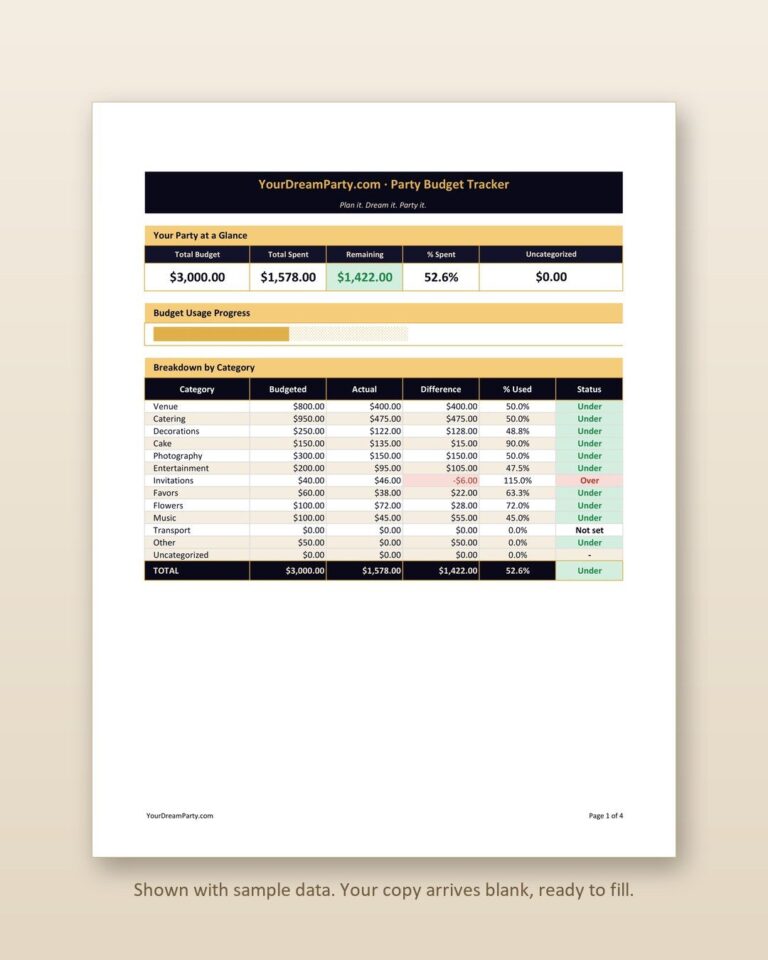
- Party Budget Tracker: 12 categories, purchase log and live dashboard
- Guest List & RSVP Manager: up to 500 guests and a live headcount
- Party Planning Timeline: 43 tasks over 12 weeks, dated from your party
- Seating Chart Template: 20 tables, conflict checker and place cards
What the Complete Party Planning Mega-Wizard Builds for Your Event
The results screen brings all 8 phases together into one planning blueprint. Most blocks spell out a concrete next step from your cross-phase decisions.
Master summary card. The first card lines up your event type, the guest count (split into adults and kids when you counted kids), the venue, the estimated event date with the days remaining, and the vibe you tagged. It is the quickest thing to share with co-hosts, vendors, or a partner reading the result for the first time.
Party Brain insights. A rule-based read across your phase answers (a home indoors with too many guests, an outdoor date with no weather backup, kids in the count alongside a drinkers bar). Use it as a quick sanity check before you review each card on its own, and the same flags run live in the Plan Builder rail while you answer.
Topic cards you can scan. The dashboard regroups your answers by job rather than by phase: budget, food, drinks, shopping, run sheet, countdown, decor, layout, entertainment, outfits and favors (once you answer those phases), vendors, and insights. They stay readable on a phone, so you can review the plan on a commute or a coffee break without expanding the wizard each time.
Day-of run sheet. A clock-stamped schedule that starts at 9am with setup, then decorations and tables, a sound check for your music choice, vendor and helper arrivals, the food and drink stations, guest arrival, the main moment (toast, cake, or reveal), any dancing and games you picked, the wind-down, with favors handed out if you chose them, and cleanup. It is the one thing you will reach for most in the final week.
Master shopping list. A checklist of products built from your phase answers. As you move through the phases, the list fills in on its own: event-type finds from Phase 1, decoration from Phase 3, serving gear from Phase 4, entertainment props from Phase 5, outfit accessories from Phase 6, favor bags and keepsakes from Phase 7, and the canopy, kids pack, and invitation cards your Phase 8 answers call for. The list saves you from juggling 8 separate shopping lists.
Budget reality-check. A dollar estimate for each of the 8 spend categories, priced per guest and scaled by your decor priorities and your venue, music, photo, cake, favor and gift answers, with its share of the total, a saving tip per line (a short note instead when your answers leave a line out), and a banner saying how far that estimate lands over or under the midpoint of your Phase 1 tier. It works as a guardrail through the prop-sourcing and vendor-confirmation weeks.
Vendor hire-by sheet. Four vendors (photographer, caterer, florist, DJ or band), each with a hire-by date counted back from your event date, an urgency chip, the lead time (in weeks, or in months for a wedding), its share of the budget, and 3 questions to ask on the call. Use it as your hand-off the week of the event.
Printable complete plan. The budget split, the food and drink quantities, the run sheet, the countdown, the vendor hire-by sheet, the Party Brain flags, and the shopping list print as one text sheet that your browser can save as a PDF. Hand that PDF to a partner, a co-host, or a wedding coordinator the week of the event and the plan travels in one document.
Optional add-on. Below the plan cards, the Ultimate Party Planner Bundle adds editable Excel templates for budget, guest list, timeline, and seating, a fillable menu planner, plus a bonus quick-start checklist for hosts who want the complete offline planning suite.
Use the Wizard Across Common Complex-Event Situations
Three patterns show up most often. Each runs the same 8 phases, but the mix of answers takes it somewhere different.
Pattern 1, wedding reception, 80 guests, $3,000-plus budget tier, 3-plus months timeline, Soft and Romantic vibe, rented hall, seated tables, a Blush anchor color, 5 decoration priorities including floral hoops and balloons and centerpieces, sit-down dinner with 3 dietary tags, a mostly-drinkers crowd, professional photographer and live band, cocktail dress code, per-guest favors with a photo prints keepsake. The wizard returns a master summary headed by the wedding and its 80 guests, and a Phase 3 palette built from the anchor color you picked. The live band earns its own sound-check line, the run sheet covers about 7 hours from a 9am setup through cleanup, and the vendor sheet covers 4 vendors. Most medium-to-large wedding receptions look like this.
Pattern 2, milestone 40th birthday, 25 guests, $1,000 to $3,000 budget tier, 1 to 2 months timeline, Elegant vibe, restaurant private area, mixed table setup, a Gold anchor color, 4 decoration priorities including centerpieces and candles and signs and floral arrangements, family-style sharing with 1 dietary tag, a mostly-drinkers crowd, guest phones plus a playlist, smart-casual dress code, a photo prints keepsake. You come away with a master summary of the birthday and its 25 guests, and a Phase 3 palette built from the anchor color you picked. The playlist gets its own sound-check line, the run sheet covers about 7 hours from a 9am setup through cleanup, and the vendor sheet covers the same 4 vendors (photographer, caterer, florist, DJ or band). That is how a milestone birthday in a restaurant private area usually comes together.
Pattern 3, baby shower, 18 guests, $500 to $1,000 budget tier, 1 to 3 weeks timeline, Soft and Romantic vibe, home garden, mixed table setup, a Sage anchor color, 3 decoration priorities including balloons and centerpieces and signs, cocktail and canapé food style with 2 dietary tags, an alcohol-free crowd with one mocktail signature, guest-only phone photography plus curated playlist, no dress code specified, a guest book keepsake. This run builds a master summary of the baby shower and its 18 guests, and a Phase 3 palette built from the anchor color you picked. The Phase 5 entertainment block stays minimal and conversational, the run sheet covers about 7 hours from a 9am setup through cleanup, and the vendor sheet covers 4 vendors (photographer, caterer, florist, DJ or band). Intimate at-home baby showers usually follow this pattern.
For more on the individual pieces, the party planning checklist guide runs through the pre-event countdown.
Pick the Right Answers Before You Run the Wizard
A few answers sharpen the whole plan. Go through these before you start, because the 8-phase output can only be as sharp as what you feed in.
Be honest about the budget tier in Phase 1. It is tempting to pick a higher tier because it produces a fancier-looking plan, but then sourcing reveals the real budget cannot cover it. The sticky budget tracker keeps you honest throughout, so the real tier means a plan that holds up when the bills arrive. Move it up only if the celebration truly calls for it.
Pick the timeline window that matches the real calendar gap. The wizard turns that answer into a date: about 2 days out for under 48 hours, 5 for 3 to 7 days, 14 for 1 to 3 weeks, 45 for 1 to 2 months, 90 for 3-plus months. Every countdown milestone and every vendor hire-by date is counted back from it, so shrinking the window to reflect your free time moves all of those dates onto the wrong days. Answer with the calendar and let the countdown depth do the rest.
Cap decoration priorities at 5 in Phase 3. The wizard enforces the cap, but it is tempting to sneak in a sixth or seventh by merging categories. Resist it; from 4 picks on, the Party Brain already asks you to put the budget into one hero moment, such as a backdrop or a balloon arch. Stretch to a sixth and 1 or 2 categories show up under-resourced and look half-finished on the day.
Pick one entertainment format in Phase 5, not a stack. A DJ plus a live band plus games plus a slideshow makes 4 peaks that compete. The music question takes one answer, and games, dancing, or a photo booth each add their own block to the run sheet, so a single lead keeps the evening coherent. Smaller moments can layer in as accents, but the lead stays singular.
Fit the Phase 6 dress code to the real tone of the celebration. Nothing in the wizard polices that pairing, so a formal dress code will sit happily next to a snacks-only menu and only your guests will notice. Pick the dress code that suits the food style, the venue, and the vibe, rather than defaulting to a formality that signals importance while clashing with everything else. Smart-casual is the most flexible default when there is no clear formality to build around.
Use Phase 8 to name who does the setup and the cleanup. The run sheet stamps its own times from a 9am start, but the setup and cleanup lines carry whichever crew you name in Phase 8, and, for a party a month or more out, the invitation format you pick there rewrites the send-out task in your countdown. Skip it and both ends of the day read "host team" and the invitation task stays generic. It is 2 minutes of answers that make the final week readable.
Frequently Asked Questions
Is the Complete Party Planning Mega-Wizard actually free?
Yes. The wizard, all 8 phases, the Party Brain insights, the day-of run sheet, the master shopping list, the vendor hire-by sheet, and the printable complete plan are all free, and nothing needs a signup. If you want the offline set, the Ultimate Party Planner Bundle ($27.00) adds editable Excel templates for budget, guest list, timeline, and seating, plus a fillable menu planner and a bonus quick-start checklist.
Does the wizard save my progress between sessions?
Yes. Every answer auto-saves to browser storage with a 7-day window, so closing the tab does not lose the work and returning the next morning continues where the previous session ended. The next time you open the wizard, the resume banner shows a Continue Planning button and a Start Fresh button, so the state stays explicit instead of silently restored.
How many phases does the wizard cover?
Eight phases (Event Basics, Venue and Infrastructure, Decorations and Atmosphere, Food and Drinks, Entertainment and Fun, Outfits and Dress Code, Favors and Gifts and Extras, Logistics and Wrap-Up). Only Phase 1 is required, so hosts can Continue past the phases that do not apply to their event and use the numbered stepper dots to come back to them later.
Can I use the wizard for any type of party?
Yes. The Phase 1 event-type picker covers 10 options (birthday, baby shower, wedding, bachelorette, housewarming, holiday, graduation, corporate, anniversary, and Just Because), and every event type gets the same 8 phases with the same options; on the later phases, a sparkle badge marks a few options that suit the event you picked. A wedding reception may spend longer on the Phase 6 outfit questions; a corporate event may lean on the Phase 8 logistics questions; an intimate dinner may skip most of Phase 5 entertainment.
What is the Ultimate Party Planner Bundle and how does it differ from the wizard?
The wizard is a live tool that builds your plan on screen, with a print view you can save as a PDF. The Ultimate Party Planner Bundle is a set of editable planning templates and printable PDFs for hosts who prefer to plan offline, or who want the planning pieces to live in a binder. The bundle is the offline companion to the online wizard; if you use both, run the wizard first, then move the 8-phase summary into the bundle's Excel templates for ongoing edits.
Can I come back and continue planning later?
Yes. Every phase auto-saves between sessions, the resume banner tells you a plan is in progress when you come back within a week, and the 8-phase structure means you can plan one phase a day or run the whole wizard in a single sitting. A complex event often takes several sessions across the planning weeks.
How do I export the final plan?
The Full Plan PDF card on the results screen opens your browser's print dialog on a text version of the plan: the budget reality-check, the food and drink numbers, the day-of run sheet, the countdown, the vendor hire-by sheet, the Party Brain insights, and the master shopping list. Choose Save as PDF there, and if a partner, a co-host, or a wedding coordinator needs the full plan the week of the event, that PDF is the one document to send.
Ready to Plan Your Complete Event?
A plan split across 6 apps never pulls itself together. The Complete Party Planning Mega-Wizard gathers all of it into one 8-phase session that tracks its own connections. You get 8 stepped phases that auto-save between sessions, a sticky budget tracker, live coherence flags in the Plan Builder rail, and a print view that puts the plan on one text sheet you can save as a PDF. The Ultimate Party Planner Bundle below takes the planning offline, with editable budget, guest list, timeline, seating, and menu templates plus a bonus checklist for hosts who want the complete offline planning suite.
This page contains affiliate links to Amazon and other retailers. As an Amazon Associate, we earn from qualifying purchases at no extra cost to you. This helps us keep all our tools free.
Results generated by this tool are for planning and inspiration purposes only. Estimates are based on general guidelines and may vary depending on your specific circumstances. Always verify with your suppliers before making purchasing decisions.