How Does the Kids Party Theme Generator Work?
The generator runs 6 short steps, and the age you pick can trim the options on the screens after it, so the theme match fits the celebration you are actually planning, not a generic kids-birthday setup. On a phone or laptop, the full session takes under 2 minutes, with no signup or email gate before the result.
Step 1, age group. Pick from 6 age brackets (1 to 2 years, 3 to 4 years, 5 to 6 years, 7 to 8 years, 9 to 10 years, 11 to 12 years). The age bracket works as a hard filter: only themes marked for that age reach the results, the food list picks up choking-safety edits for the 2 youngest brackets, and toddler favors with small parts are swapped out.
Step 2, interests. Pick up to 3 from the 18 interest tags (animals, dinosaurs, princesses, superheroes, space, ocean, pirates, fairies, magic, sports, cars and vehicles, robots, science, music, art and crafts, nature, cooking, mystery and detective); a few drop off the list for toddlers, preschoolers, and tweens, since only tags with a theme for that age show. Each tag pushes the matching themes up the list.
Steps 3 and 4, venue and guest mix. Pick venue (at home, backyard, park, rented space, indoor playspace) plus guest mix (kids only at a drop-off party, kids plus parents, mixed family, or school class, which is hidden for toddlers). Each answer gives a point to the themes suited to that space or crowd, so it moves those themes up the list without removing any, and neither answer changes a theme's decorations or activities.
Steps 5 and 6, season and budget. Pick season (Spring, Summer, Fall, Winter, or Any / Don't know, with the current season already selected when you start) and budget band (under $100, $100 to $250, $250 to $500, $500-plus). Season and budget each add a point to the themes that fit them, and the top card's why-it-fits note names your budget band when the theme fits it; the theme content itself comes out the same whichever season or band you choose.
🛒 As an Amazon Associate, we earn from qualifying purchases, at no extra cost to you.
Kids Party Decoration Set
Shop on AmazonKids Party Tableware
Shop on AmazonKids Party Game Set
Shop on AmazonWhy the Kids Party Theme Generator Beats a Saved Screenshot Pile
A folder of saved screenshots is a common starting point for parents planning a kids party, but it has hidden costs. Parents who plan from a screenshot pile can copy a theme that suited a different age group and end up either shifting direction mid-week or running into a franchise copyright problem on the signage. The generator keeps every theme that does not fit the child's age out of the results, and every theme in its library is an original concept with no licensed characters, so all 4 directions come back age-appropriate and franchise-free before any cake order goes out.
Five reasons it holds up across multiple kids birthdays.
- A match plus alternatives, not one rabbit hole. A single theme decision creates pressure when the child changes their mind at the dinner table. A top match with 3 alternatives beside it gives the family options to compare against the venue, the budget, and the child's mood, then commit with confidence. Each alternative card shows its own match percentage and a short atmosphere description, so the family can see how close the runners-up came before choosing.
- Copyright-safe concept anchoring. Every theme direction uses original, non-licensed concepts (Dinosaur Dig, Undersea Explorer, Art Studio, Construction Zone, Garden Party, Mad Scientist Lab). This keeps the theme itself clear of the franchise-IP risk that comes with licensed-theme alternatives, as long as the signage, invitations, and clipart you make stay character-free too. Anyone who has seen a licensed-character cake topper taken down on a craft marketplace will see why that matters.
- Themes filtered by age. A 3-year-old dinosaur party needs short rotation activities (10-to-15-minute blocks) and parallel-play setup; a 9-year-old space party needs longer structured rounds (20-to-30-minute blocks) and team-game format. The generator keeps the results to themes marked for the Step 1 age bracket, so the activity ideas on the top card come from a theme meant for that age; the block lengths and the run-of-show are yours to set.
- Venue weighed into the match. A backyard allows ground-level installations and stake-mounted props that an indoor playspace forbids. A rented space with table service constrains the floor-craft activities a party at home supports. The generator adds a point to every theme listed for the venue you picked, which lifts the directions suited to that space without ruling the others out, so check the decoration checklist against the room yourself.
- Copyright-safe clipart linked from the result page. Every result carries a link to the Kids Party Mega Bundle, clipart for the printable signage, the invitations, the cupcake toppers, and the favor-bag labels. It comes as one instant download, which saves a late-night graphic-design scramble.
The generator pairs naturally with the Balloon Garland & Arch Calculator for the entrance arch sizing once the theme colors are settled, the Party Budget Calculator for a spending estimate broken out by category, and the Last-Minute Emergency Planner for the parents who land on the generator with 3 days or less to go.
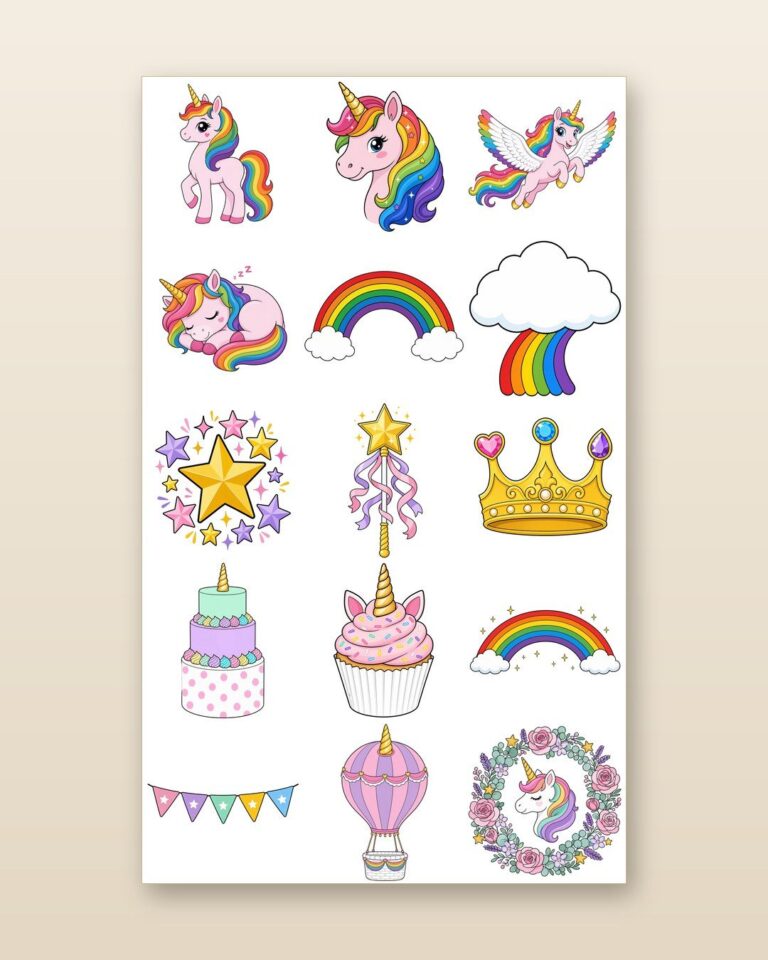
Kids Party Mega Bundle
- 5 clipart sets: Unicorn, Dinosaur, Princess, Mermaid and Jungle & Safari
- 15 transparent PNGs per set, 75 in all
- Bright cartoon style with bold outlines
- No white box: the images drop straight into any design
What the Kids Party Theme Generator Builds for Your Celebration
The results page gathers your 6 answers into a complete theme reference. Each card gives the family a clear next move in the planning week.
One top theme match, plus 3 alternatives. The top card carries the theme name (Dinosaur Dig, say), the atmosphere it sets, a short why-it-fits note, and then its Decoration Checklist, Activity Ideas, Food and Snacks, and Party Favor Ideas. The 3 alternate cards below it are lighter, carrying only a name, a match percentage, and a short atmosphere description, so the family can compare directions before committing to the top pick.
Decoration checklist. A line-by-line list belonging to the matched theme. Dinosaur Dig runs green crepe-paper jungle vines along the walls, a sand pit with hidden skeleton pieces, cut-out dino tracks leading to the cake, an inflatable T-rex or stegosaurus as a photo prop, and a dry-ice volcano centerpiece that only adults handle. Your venue answer helps decide which theme surfaces as the match, not which lines appear once it has.
Activity ideas. Three activities belonging to the matched theme, the same list at every age that theme fits apart from a few toddler-safe swaps in the 1-to-2 bracket, with a safety note on candy activities for under-4s. A 5-to-6-year-old dinosaur party gets a sandbox fossil dig with brushes and goggles, pin-the-tail-on-the-stegosaurus, and a dino egg hunt with hidden chocolate eggs. A 9-to-10-year-old space party gets a cup-and-flashlight constellation projector, an astronaut training obstacle course, and moon-rock painting with glow paint.
Food and snacks. A short themed menu per theme (dino nuggets with green dipping sauce for Dinosaur Dig, blue gelatin cups with gummy fish for Mermaid Lagoon, a paint-palette cupcake platter for Art Studio). The list names the dishes without recipes or ingredient quantities, and for ages 1 to 4 it adds choking-safety edits and a safety note that ends with a reminder to check guest allergies.
Clipart bundle reference. A link to the Kids Party Mega Bundle for invitations, cupcake toppers, banners, and favor-bag labels. The bundle is designed for parents who want to print at home or upload to a same-day photo lab.
Printable plan. The Print button brings up your browser's print window with the top theme card and the alternates laid out for paper (save it as a PDF there if you want a file), for the planning binder, the partner hand-off, or for use as a shopping reference at the party-supply store.
What the bundle holds. The Kids Party Mega Bundle card sits under the alternates and lists 5 clipart sets (unicorn, dinosaur, princess, mermaid, and jungle and safari) with 15 transparent PNGs in each, plus a printable activity sampler of connect the dots, color by number, and tic-tac-toe, all original artwork with no licensed characters.
Use the Generator Across Common Kids Party Setups
Three example patterns show the range. Each one runs the same 6 steps, but the result changes because your answers pull the themes in a different direction.
Pattern 1, age 5 to 6, interests dinosaurs plus art and crafts plus animals, backyard, kids only at a drop-off party, summer, $100 to $250 budget. This setup returns Dinosaur Dig as the top match, with Safari Expedition, Big-Top Circus, and Cowgirl Rodeo sitting under it as alternatives on the same match percentage, the Dinosaur Dig decoration checklist and its activity ideas (a sandbox fossil dig, a dino egg hunt), matching food and favor ideas, and the clipart bundle link right below the alternates. Built for early-elementary backyard birthdays.
Pattern 2, age 9 to 10, interests space plus robots plus music, rented space, kids plus parents, fall, $250 to $500 budget. For this one the generator surfaces Space Adventure as the top match, with Astronaut Academy, Mad Scientist Lab, and Big-Top Circus as the alternatives, the winning theme's own decoration checklist and activity ideas, its food and favor ideas, and the clipart bundle link under the alternate cards. Made for upper-elementary venue-based parties.
Pattern 3, age 3 to 4, interests ocean plus animals plus music, at home, mixed family, winter, under $100 budget. Here the generator surfaces Mermaid Lagoon as the top match, with Undersea Explorer, Ocean Adventure, and Dinosaur Dig as the alternatives, the winning theme's decoration checklist and activity ideas, its food and favor ideas, and the clipart bundle link beneath the alternatives. It suits preschool winter celebrations.
To explore theme-specific styling further, the kids party themes guide covers theme variations in depth, the kids party games guide walks through the activity layer per age, and the kids party ideas by age guide handles age-by-age planning across the spectrum.
Pick the Right Answers Before You Generate
A few inputs sharpen the recommendation. Run through these before you start so the generator has clear inputs to work from.
Pick the age bracket the child will be on the party day, not their current age. If the birthday is 2 months out and the child is currently 5 but turning 6, pick the 5-to-6 bracket. The age bracket decides which themes can reach the results at all, so picking the right one shapes the whole plan.
Let the child pick the 3 interests honestly. Parents often trim the interest list to what photographs well on social media. The generator works best when the interests come from the child (so dinosaurs and cooking and music, even if the look is messy). The match favors the themes that cover the most of those interests, and the why-it-fits note on the top card names the ones it matched; the child does not need to do that work.
Answer the venue question by the physical space, not the address. A home with a small patio where guests will gather outdoors counts as backyard, not at home. A community hall with table-only setup counts as rented space, not at home. The venue point goes to the themes listed for that type of space, so the physical reality counts, not the technical label.
Be honest about the guest mix. A mixed family of cousins, aunts, and grandparents behaves differently than a school class, even if the headcount is identical. The guest mix earns a point for the themes suited to that crowd but leaves the activity list as it is, so plan parallel play for mixed ages or structured rounds for a class yourself.
Pick the season the celebration actually falls in. The tool starts on the current season by your device's clock, not the date of the party, so change it if you are planning ahead. Season adds a point to the themes suited to that time of year, and themes marked for any season always get it. The colors and decorations of each theme stay fixed, so check the atmosphere against the natural light on the day.
Save the result before the party-supply run. A printout from the Print button is the cleanest reference for the trip to the party shop, the cake order with the bakery, and the day-of decoration sequence. Print it for the planning binder; share it with the partner so both adults align on the same theme direction; refer back when the temptation hits to add a different cartoon character mid-week.
Frequently Asked Questions
Is the Kids Party Theme Generator actually free?
Yes. The generator, the top theme match and its 3 alternatives, the decoration checklist, the activity ideas, the food and snack ideas, and the print option cost nothing and require no signup. The optional upgrade is the Kids Party Mega Bundle ($18.00), which adds 5 clipart sets of 15 transparent PNGs each and a printable kids activity sampler, all original artwork.
Why does the generator avoid franchise character themes?
Printable signage, invitation templates, and clipart bundles built around licensed characters carry copyright risk. A marketplace listing that copies a franchise design can draw a takedown notice. The generator builds every theme around original, non-licensed concepts (Dinosaur Dig, Undersea Explorer, Art Studio, Construction Zone) so the matching printables carry no licensed characters and can be printed again for future events. Parents who want a specific franchise character can run the theme alongside on cake toppers but should avoid printing branded artwork themselves.
Can I use this for a mixed-age party with siblings and cousins?
Yes. The Step 4 guest mix picker includes a mixed family option (cousins, aunts, grandparents) that gives a point to the themes suited to a family crowd. The activity list and the decorations stay as they are for any guest mix, so pair a quiet craft table with a running game, and younger and older kids both have something to do at the same moment.
Does the generator handle parties with parents staying the whole time?
Partly. The Step 4 guest mix picker includes a kids plus parents option (parents stay and chat) that scores a point for the themes suited to that crowd, but a theme's food, activity, and decoration lists match the ones a drop-off party gets. Plan the grazing table (so parents have something to eat), the parent-included games (so adults are not standing on the sideline), and a parent-comfort zone with chairs and a drinks station yourself.
What age range does this generator cover?
The generator covers ages 1 through 12 across 6 brackets (1 to 2, 3 to 4, 5 to 6, 7 to 8, 9 to 10, 11 to 12). For tweens at the upper end of the range, the princess and fairy interests drop off and the fitting themes include project-based concepts (Art Studio, Mad Scientist Lab, Wizard Academy) since costume-heavy or character-driven themes start to feel infantile for that age. For the 1-to-2 bracket, the list narrows to 12 gentle themes (Down on the Farm, Rainbow Burst, Woodland Critters) with choking-safety edits on the food and small-part favors swapped out, since the celebration is more for the parents and family than the child themselves.
Does the generator set activity time blocks?
No. The top card lists the theme's activity ideas without times, so the pacing is yours to set. As a working guide, 3-to-4-year-olds run 10-to-15-minute blocks; 9-to-10-year-olds run 20-to-30-minute blocks. Some kids will burn through an activity faster, others will linger. Pad the run-of-show with one extra activity in reserve to absorb variability.
Can I buy one theme's clipart bundle instead of the full Mega Bundle?
Not from the result page. It carries a single clipart option, the Kids Party Mega Bundle, and there is no separate single-theme purchase alongside it. The bundle suits parents who run multiple parties (siblings, repeat events); for a one-off, the free theme reference still prints on its own.
Ready to Plan the Kids Birthday Theme?
When the theme has already changed 3 times and the printable banner sits one cease-and-desist away, open the Kids Party Theme Generator for a ready-to-build top theme match built around the child's age, interests, and venue. Under 2 minutes, 6 steps, 1 theme match with 3 alternatives beside it, a decoration checklist, activity ideas, food and snack ideas, and a printable theme card. The Kids Party Mega Bundle below expands on the result with 5 copyright-safe clipart sets for families planning multiple parties over time.
This page contains affiliate links to Amazon and other retailers. As an Amazon Associate, we earn from qualifying purchases at no extra cost to you. This helps us keep all our tools free.
Results generated by this tool are for planning and inspiration purposes only. Estimates are based on general guidelines and may vary depending on your specific circumstances. Always verify with your suppliers before making purchasing decisions.